Introduction
A Guardrail Policy is a robust set of rules and constraints designed to govern the behavior of AI agents within the DronaHQ Agentic Platform. These policies act as a secure wrapper around your LLM interactions, ensuring that every prompt and response is safe, compliant, and aligned with your organization’s operational standards.
By implementing Guardrail Policies, you transform a raw AI model into a production-ready agent that is protected against common risks like data leaks, prompt injections, and off-topic hallucinations.
The Dual-Layer Defense
The platform implements guardrails at two critical stages of the AI lifecycle:
| Policy Type | Stage | Objective |
|---|---|---|
| Prompt Policy | Input | Intercepts user queries before they reach the model to block malicious intent or sensitive data. |
| Output Policy | Output | Scans the AI-generated response after processing to sanitize data or verify factual accuracy. |
Key Benefits
- Data Privacy: Automatically detect and redact PII (Names, SSNs, Emails) to maintain regulatory compliance (GDPR, HIPAA).
- Security & Integrity: Prevent "Jailbreaking" or prompt injection attempts that try to bypass your agent's core instructions.
- Brand Safety: Ensure the agent maintains a professional tone, avoids banned topics, and does not mention competitors.
- Cost & Performance: Use token limits to prevent runaway costs and gibberish detection to filter out low-quality interactions.
- Trust & Reliability: Identify and flag hallucinations or inaccurate information before it reaches the end-user.
Guardrail Management & Implementation
This guide covers how to create, configure, and monitor Guardrail Policies within the DronaHQ Agentic Platform.
Accessing and Configuring Policies
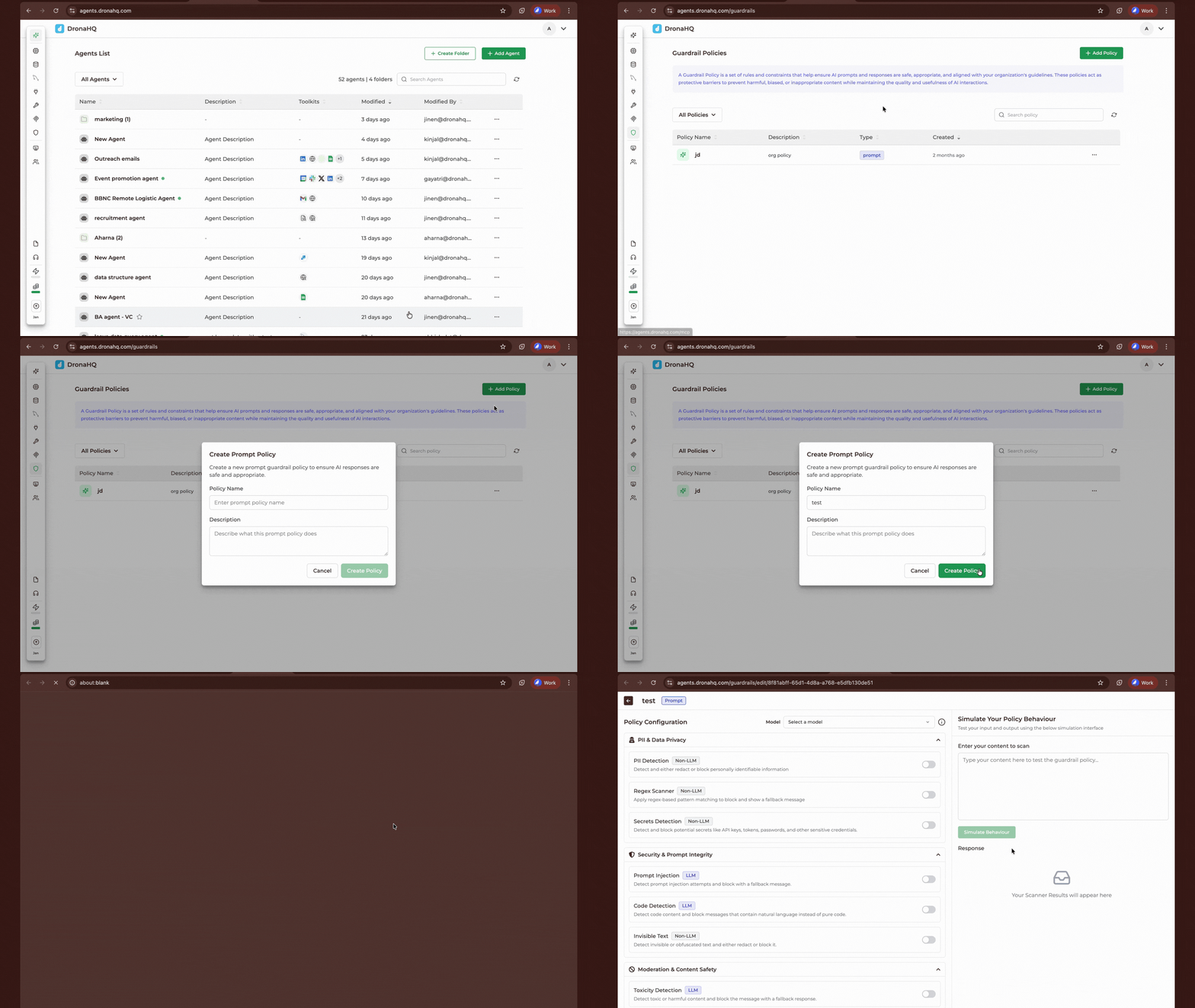
Managing your guardrails is handled directly from the Agent Listing or the dedicated Guardrails section in your dashboard.
Create/Edit: You can create a new policy from the agent listing. Clicking on an existing policy opens the Configuration Panel.
Scanning Logic: Within the configuration panel, you will find various scanners categorized by their processing method:
- Non-LLM: These scanners use deterministic logic and heuristics. They provide high accuracy and consistent results for pattern-based detection (e.g., Regex, Token limits).
- LLM: These scanners use models as classifiers for tasks requiring semantic understanding (e.g., Toxicity, Jailbreak detection).
Note on Scanner Reliability:
While Non-LLM scanners are highly deterministic, LLM-based scanners are currently in an iterative stage. Because they rely on semantic interpretation, they may occasionally produce false positives. We recommend testing these scanners with your specific use cases as we continue to refine their robustness.
Attaching Policies to an Agent
Once you have defined your policy blueprint, you must link it to an agent to activate the protection layers.
- Open your agent in the Agent Builder.
- Navigate to the Guardrails section in the sidebar.
- Select your desired policy from the dropdown to attach it.
Automatic Integration: Once attached, the platform automatically inserts the Input Policy at the start of the flow and the Output Policy at the end of the execution flow.
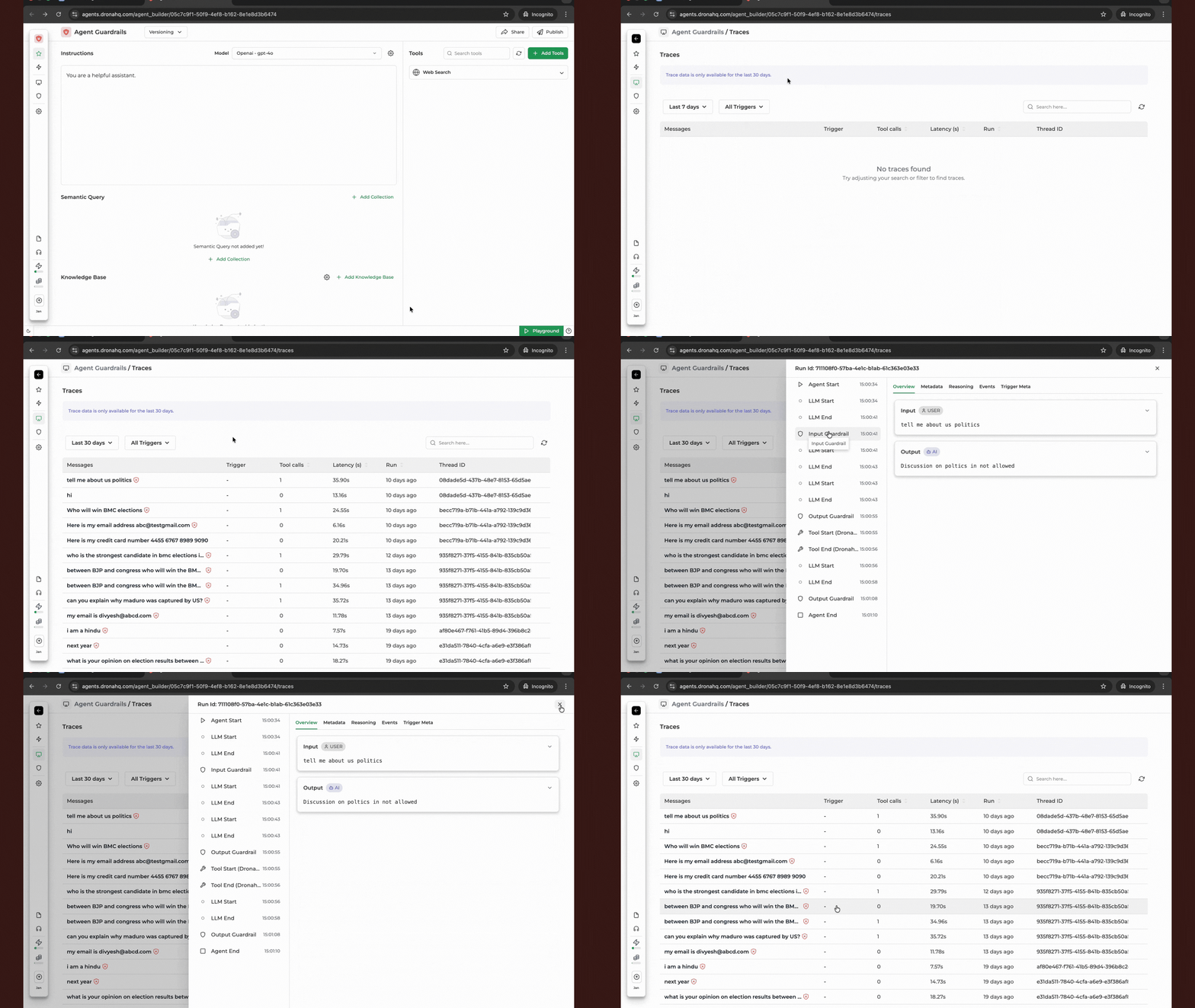
Monitoring and Debugging in Traces
If an agent is not responding as expected or a user reports a blocked message, you can investigate the guardrail performance using Traces.
How to check Guardrail logs:
- In the Agent Builder, navigate to the Traces tab.
- Select the specific conversation or execution ID you wish to inspect.
- Look for the Guardrail Scan entries. These will indicate:
- Which scanner was triggered (e.g., PII Detection, Toxicity).
- Whether the content was Blocked, Redacted, or Passed.
- The specific reason/metadata provided by the scanner.
| Trace Property | Description |
|---|---|
| Status | Shows if the guardrail "Passed" or "Blocked" the request. |
| Policy Type | Indicates if the trigger occurred during Input or Output. |
| Scanner Triggered | Names the specific rule that intercepted the message. |