DronaHQ Triggers
DronaHQ supports 145+ triggers from major platforms and services. These triggers allow your agents to respond to events from various applications and services automatically.
Quick Start
- Open an agent
- Add a trigger (Gmail, Slack, GitHub, etc.)
- Authenticate once
- Choose the event
- Your agent starts running automatically
What Are DronaHQ Triggers?
DronaHQ Triggers are platform-specific integrations that connect your AI agents directly to popular services like Gmail, Slack, GitHub, Salesforce, and many more. When an event occurs in one of these platforms, your agent automatically activates and processes the event.
Think of DronaHQ Triggers as bridges between your favorite tools and your AI agent. Instead of manually checking for updates or building custom webhooks, these triggers handle the integration for you.
Why Use DronaHQ Triggers?
DronaHQ Triggers enable seamless automation across your entire tech stack:
- No-code integration: Connect to 145+ platforms without writing code
- Real-time automation: Agents respond instantly to events as they happen
- Unified workflow: One agent can monitor multiple platforms simultaneously
- Easy setup: Authenticate once and configure event triggers in minutes
- Reliable delivery: Built-in error handling and retry mechanisms
How DronaHQ Triggers Work
Connect your platform account
- Authenticate with the service (Gmail, Slack, GitHub, etc.)
- Grant necessary permissions
Configure event triggers
- Select which events should activate your agent
- Choose specific conditions or filters
Event occurs in the platform
- A new email arrives in Gmail
- A message is posted in Slack
- A pull request is created in GitHub
- Or any other configured event
Your agent activates automatically
- Receives the event data as context
- Executes its instructions
- Can respond, process data, or trigger other actions
Each trigger execution is independent and isolated, ensuring reliable performance even with high event volumes.
Trigger Types: Polling vs Real-Time
DronaHQ triggers use two mechanisms to detect events:
- Polling triggers: Check for changes at regular intervals (e.g., every minute, every 5 minutes). These are reliable and work with most platforms, but may have a slight delay between when an event occurs and when your agent is notified.
- Real-time triggers: Uses webhooks to receive instant notifications when events occur. These provide immediate responses but require the platform to support webhook callbacks.
DronaHQ automatically manages reliability, retries, and deduplication for both types. The trigger interface will indicate whether a trigger uses polling or real-time mechanisms.
Adding Triggers to an Agent
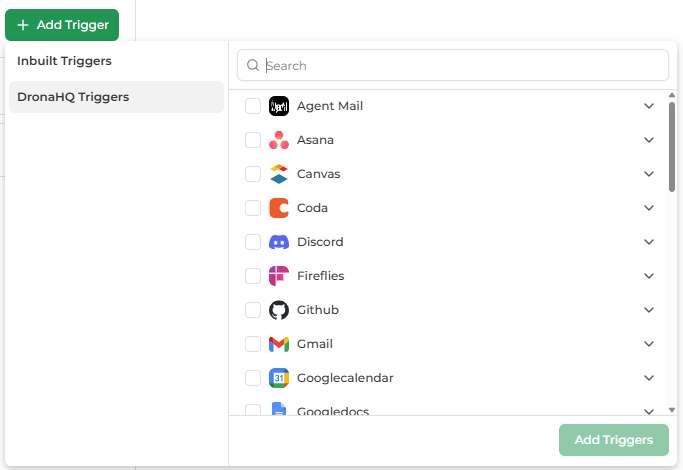
An agent can have one or multiple triggers.
Steps to Add a Trigger
- Open your agent
- Click Add Trigger → DronaHQ Triggers
- Select one or more trigger types
- Click Add Triggers
Each selected trigger becomes a new entry point to the same agent logic.
Example: Gmail → Slack Automation
Here's a concrete example of how triggers work in practice:
Scenario: You want to automatically summarize important emails and post them to a Slack channel.
- Set up the Gmail trigger: Configure "New Gmail Message Received" to monitor your inbox
- Configure filters: Add a query like
from:important@company.comto only process specific emails - Agent activates: When a matching email arrives, the trigger fires and passes the email content to your agent
- Agent processes: Your agent (with instructions to summarize emails) reads the email and creates a summary
- Agent responds: The agent posts the summary to your designated Slack channel using a Slack tool
This entire flow happens automatically—no manual intervention needed. The trigger handles the Gmail integration, and your agent handles the logic.
Limitations
When working with DronaHQ Platform Triggers, please be aware of the following limitations:
Triggers Cannot Be Edited Once Saved
Once a trigger is configured and saved, it cannot be edited. If you need to make changes to a trigger's configuration:
- Delete the existing trigger
- Create a new trigger with the updated configuration, or
- Duplicate the trigger and modify it before saving
This ensures data integrity and prevents conflicts in trigger configurations.
Duplicate Trigger Restrictions
You cannot create multiple triggers with the same account and identical configuration, even across different agents. To create a similar trigger, you must:
- Use a different account or
- Use a different configuration (e.g., different parameters, filters, or query settings)
This limitation prevents duplicate event processing and ensures each trigger configuration is unique within your DronaHQ workspace.
Available DronaHQ Triggers
Browse the complete list of platform triggers organized by category:
You don't need to understand all of these—start with the platform you already use. Jump to: Communication | Project Management | Google Workspace | CRM & Sales | Payments
Communication & Messaging
Gmail
- Email Sent: Triggers when a Gmail message is sent by the authenticated user. It polls the 'SENT' label and emits metadata including sender, recipients, subject, timestamp, and thread ID.
- New Gmail Message Received: Triggers when a new message is received in Gmail.
Outlook
- New Contact Added: Triggered when a new contact is added in the Outlook contacts.
- Calendar Event Changes: Triggered when a new calendar event occurs (created, updated, or deleted) in the Outlook calendar.
- New Calendar Event: Triggered when a new calendar event is created in the Outlook calendar.
- New Outlook Message: Triggered when a new message is received in the Outlook mailbox.
- New Sent Message: Triggered when a new message is sent from the Outlook mailbox.
Agent Mail
- New Email Received: Trigger for new emails in an AgentMail inbox.
Slack
- New Channel Created: Triggered when a new channel is created in Slack.
- Reaction Added: Triggered when a reaction is added to a message in Slack.
- Reaction Removed: Triggered when a reaction is removed from a message.
- New Bot Message Received: Triggered when a new bot message is posted to a Slack channel.
- New Direct Message Received: Triggered when a new direct message (DM) is sent to a user in Slack.
- New Private Channel Message Received: Triggered when a new message is posted to a private channel in Slack.
- New Message Received: Triggered when a new message is posted to a Slack channel.
- New Multi-Person Direct Message Received: Triggered when a new message is posted to a multi-person direct message in Slack.
- Thread Reply Received: Triggered when reply is added to a message in a thread. Excludes the parent message_replied event by design (ts != thread_ts check).
Slackbot
- New Channel Created: Triggered when a new channel is created in Slack.
- Reaction Added: Triggered when a reaction is added to a message in Slack.
- Reaction Removed: Triggered when a reaction is removed from a message.
- New Bot Message Received: Triggered when a new bot message is posted to a Slack channel.
- New Direct Message Received: Triggered when a new direct message (DM) is sent to a user in Slack.
- New Private Channel Message Received: Triggered when a new message is posted to a private channel in Slack.
- New Message Received: Triggered when a new message is posted to a Slack channel.
- New Multi-Person Direct Message Received: Triggered when a new message is posted to a multi-person direct message in Slack.
- Thread Reply Received: Triggered when reply is added to a message in a thread. Excludes the parent message_replied event by design (ts != thread_ts check).
Discord
- New Discord Message: Polls a specific Discord channel for new messages.
Project Management & Collaboration
Asana
- Task Trigger: Task Trigger
Jira
- New Issue: Triggered when a new issue is created in Jira
- New Project: Triggered when a new project is added in Jira
- Updated Issue: Triggered when an issue is updated in Jira
Linear
- Comment Received: Triggered when a comment is received.
- Issue Created: Triggered when a new issue is created.
- Issue Updated: Triggered when an issue is updated. For example labels are changed, issue status is changed, etc.
Trello
- Card Archived: Triggered when a card is archived in the specified board
- New Activity: Triggered when there is activity in Trello.
- New Board: Triggered when a board is created in the specified workspace
- New Card: Triggered when a card is created in the specified board
- Card Updated: Triggered when a specific card is updated
Todoist
- New Task Created: Trigger when a new task is added to Todoist.
Notion
- All Page Events: Triggers when any Notion page is created or updated across the workspace.
- New Comment: Triggers when a new comment is added to a specified Notion block or page.
- New Page: Triggers when a new page is added to a Notion database.
- Page Added to Page: Fires when a new subpage (a
child_pagetype block) is added under a specified parent Notion page. - Page Updated: Triggers when any block within a specified Notion page is updated.
Coda
- Document Deleted: Triggers when a Coda document is deleted.
- New Document: Triggers when a new Coda document is created.
- New Page: Triggers when a new page is added to a Coda document.
- Page Updated: Triggers when a specific page within a Coda document is updated.
Google Workspace
Google Calendar
- Attendee Response Changed: Polling trigger that fires when any attendee's RSVP changes to accepted, declined, or tentative. Returns attendee info and current status.
- Event Canceled or Deleted: Triggers when a Google Calendar event is cancelled or deleted. Returns minimal data: event_id, summary (if available), and cancellation timestamp.
- Event Starting Soon: Triggers when a calendar event is within a configured number of minutes from starting. Includes countdown window, start time, and event metadata.
- Calendar Event Changes: SOON TO BE DEPRECATED - Use Calendar Event Sync (polling trigger) instead. Real-time webhook trigger for calendar event changes. Returns event metadata only. For full event data, use Calendar Event Sync (polling trigger).
- Event Created: Polling trigger that fires when a new calendar event is created. Returns event ID, summary, start/end times, and organizer info.
- Calendar Event Sync: Polling trigger that returns full event data including details, attendees, and metadata. For real-time notifications with basic info, use Calendar Event Changes (webhook).
- Event Updated: Triggers when an existing Google Calendar event is modified. Returns the event ID, change type, and the specific fields that changed with their previous and new values.
Google Docs
- Document Deleted: Triggers when an existing Google Doc is deleted (moved to trash). This trigger monitors Google Docs and fires when documents are trashed.
- Document Updated: Triggers when an existing Google Doc is updated or modified. This trigger monitors Google Docs and fires when documents are updated.
- New Folder Created in Root: Triggers when a new folder is created in the root folder of Google Drive. This trigger monitors Google Drive and fires when new folders are detected in the root directory.
- New Document Added: Triggers when a new Google Doc is added/created. This trigger monitors Google Docs and fires when new documents are detected.
Google Sheets
- New Rows in Google Sheet: Simple polling trigger that monitors Google Sheets for new rows. Detects when new rows are added and returns the complete row data. Perfect for triggering any workflow based on new sheet entries.
- New Sheet Added in Google Spreadsheet: Polling trigger that detects when a new sheet is added to a Google Spreadsheet.
Google Slides
- New Slide Added: Fires when a new slide is added to a Google Slides presentation.
Google Drive
- Comment Added (Docs/Sheets/Slides): Triggers when a new comment is added to Google Docs, Sheets, or Slides.
- File Created: Triggers when a new file is created/added in Google Drive. This trigger monitors files and fires when new files are detected.
- File Deleted or Trashed: Triggers when a file is moved to trash or permanently deleted in Google Drive.
- File Shared (Permissions Added): Triggers when new sharing permissions are granted to a file or folder in Google Drive. This trigger monitors the Drive Changes API to detect files that changed and, for those files, compares their current permissions against previously seen permissions to identify newly added sharing entries.
- File Updated: Triggers when a file's metadata or content changes in Google Drive. Emits file ID, modification timestamp, and editor info.
- Google Drive Changes: Triggers when changes are detected in a Google Drive.
- New File Matching Query: Triggers when a new Google Drive file matches a provided query.
Google Super
- Attendee Response Changed: Polling trigger that fires when any attendee's RSVP changes to accepted, declined, or tentative. Returns attendee info and current status.
- Comment Added (Docs/Sheets/Slides): Triggers when a new comment is added to Google Docs, Sheets, or Slides.
- Document Deleted: Triggers when an existing Google Doc is deleted (moved to trash). This trigger monitors Google Docs and fires when documents are trashed.
- Document Updated: Triggers when an existing Google Doc is updated or modified. This trigger monitors Google Docs and fires when documents are updated.
- Email Sent: Triggers when a Gmail message is sent by the authenticated user. It polls the 'SENT' label and emits metadata including sender, recipients, subject, timestamp, and thread ID.
- Event Canceled or Deleted: Triggers when a Google Calendar event is cancelled or deleted. Returns minimal data: event_id, summary (if available), and cancellation timestamp.
- Event Starting Soon: Triggers when a calendar event is within a configured number of minutes from starting. Includes countdown window, start time, and event metadata.
- File Created: Triggers when a new file is created/added in Google Drive. This trigger monitors files and fires when new files are detected.
- File Deleted or Trashed: Triggers when a file is moved to trash or permanently deleted in Google Drive.
- File Shared (Permissions Added): Triggers when new sharing permissions are granted to a file or folder in Google Drive. This trigger monitors the Drive Changes API to detect files that changed and, for those files, compares their current permissions against previously seen permissions to identify newly added sharing entries.
- File Updated: Triggers when a file's metadata or content changes in Google Drive. Emits file ID, modification timestamp, and editor info.
- New Folder Created in Root: Triggers when a new folder is created in the root folder of Google Drive. This trigger monitors Google Drive and fires when new folders are detected in the root directory.
- Calendar Event Changes: SOON TO BE DEPRECATED - Use Calendar Event Sync (polling trigger) instead. Real-time webhook trigger for calendar event changes. Returns event metadata only. For full event data, use Calendar Event Sync (polling trigger).
- Event Created: Polling trigger that fires when a new calendar event is created. Returns event ID, summary, start/end times, and organizer info.
- Calendar Event Sync: Polling trigger that returns full event data including details, attendees, and metadata. For real-time notifications with basic info, use Calendar Event Changes (webhook).
- Event Updated: Triggers when an existing Google Calendar event is modified. Returns the event ID, change type, and the specific fields that changed with their previous and new values.
- Google Drive Changes: Triggers when changes are detected in a Google Drive.
- New File Matching Query: Triggers when a new Google Drive file matches a provided query.
- New Gmail Message Received: Triggers when a new message is received in Gmail.
- New Rows in Google Sheet: Simple polling trigger that monitors Google Sheets for new rows. Detects when new rows are added and returns the complete row data. Perfect for triggering any workflow based on new sheet entries.
- New Sheet Added in Google Spreadsheet: Polling trigger that detects when a new sheet is added to a Google Spreadsheet.
- New Document Added: Triggers when a new Google Doc is added/created. This trigger monitors Google Docs and fires when new documents are detected.
- New Slide Added: Fires when a new slide is added to a Google Slides presentation.
CRM & Sales
Salesforce
- Account Created or Updated: Triggers when an Account is created or updated in Salesforce. Uses LastModifiedDate high-watermark to capture both creations and updates.
- Contact Updated: Triggers when an existing Salesforce Contact record is modified. Emits changed fields alongside relevant timestamps.
- Record Updated (Generic SObject): Triggers when monitored fields change on any Salesforce SObject. You specify the SObject type and which field values should be returned in the payload. The trigger uses SystemModstamp to detect changes regardless of which specific field changed.
- New Contact: Triggers when a new Contact is Created in Salesforce.
- New Lead: Triggers when a new Lead is created in Salesforce.
- New or Updated Opportunity: Triggers when a Salesforce Opportunity is created or updated.
- Task Created or Completed: Triggers when a Task is created or when its status changes to Completed in Salesforce. Supports optional filtering by task Status or Subject.
HubSpot
- Contact Created: Triggers when a new contact is created in HubSpot.
- Deal Stage Updated: Triggers when a deal stage is updated in HubSpot.
Pipedrive
- New Deal: Triggered when a new deal is created in Pipedrive
- New Note: Triggered when a new note is created in Pipedrive
- New Organization: Triggered when a new organization is created in Pipedrive
Zendesk
- New User Created: Triggered when a new user is created in Zendesk.
- New Zendesk Ticket: Triggers when a new ticket is created in a specified Zendesk view.
Development & Code
GitHub
- Commit Event: Triggered when a new commit is pushed to a repository.
- Follower Changes: Triggers when there are changes in GitHub followers.
- Issue Added Event: Triggered when a new issue is added to the repository.
- Label Added Event: Triggered when a new label is added to a pull request.
- Pull Request Event: Triggered when a pull request is opened, closed, or synchronized.
- Star Added Event: Triggered when a new star is added to the repository.
Productivity & Note-Taking
Fireflies
- Transcription Complete: Triggers when a transcription is complete. Polls Fireflies API for transcripts created or updated since the last poll time. Handles rate limiting gracefully.
TimelinesAI
- New WhatsApp Message Received: Polling trigger that monitors for new messages received in TimelinesAI WhatsApp chats.
Cloud Storage
OneDrive
- OneDrive File Created: Triggers when a new file is created in OneDrive. Uses Gmail-style state management for reliable duplicate prevention.
- File Updated: Triggers when a OneDrive file's content or metadata changes. Returns file ID, last modified time, and modifier info.
- OneDrive Folder Created: Triggers when a new folder is created in OneDrive. Uses Gmail-style state management for reliable duplicate prevention.
- OneDrive Item Deleted: Triggers when a file or folder is deleted in OneDrive. Uses Gmail-style state management for reliable duplicate prevention.
- Item Moved or Renamed: Triggers when a file or folder is moved to a different path or renamed in OneDrive. Includes both old and new path/name data in the payload.
- OneDrive Item Updated: Triggers when an existing file or folder is modified in OneDrive. Uses Gmail-style state management and only detects actual modifications, not new creations.
- New Version Created: Trigger that fires when a new version of a specified OneDrive file is created.
- Sharing Permission Added or Removed: Sharing Permission Added or Removed
Marketing & Email Campaigns
Mailchimp
- Campaign: Triggered when a campaign is sent or experiences an event in Mailchimp
- Profile Update: Triggered when a subscriber's profile is updated in Mailchimp
- Subscribe: Triggered when a subscriber subscribes to Mailchimp
- Unsubscribe: Triggered when a subscriber unsubscribes from Mailchimp
Education
Canvas
- Canvas Assignment Graded: Polls Canvas for newly graded submissions for a specific assignment.
- New Canvas Assignment Submission: Polls Canvas for new submissions to a specific assignment.
- New Canvas Discussion Message: Polls Canvas discussion topics for new messages.
- New Canvas Discussion Topic: Polls a Canvas course for new discussion topics.
- New Course Created for User: Polls Canvas for newly created courses for a specific user.
- New Canvas File Upload: Polls a Canvas course for new file uploads.
Media & Entertainment
YouTube
- New YouTube Activity: Triggers when a new activity is detected on a YouTube channel.
- New Item in YouTube Playlist: Triggers when a new item is added to a YouTube playlist.
- New Playlist in YouTube Channel: Triggers when a new playlist is added to a YouTube channel.
- New YouTube Channel Subscription: Triggers when a new channel is subscribed.
Spotify
- New Device Added: Triggers when a new device is added.
- Spotify Playlist Item Change: Triggers when songs are added to or removed from a Spotify playlist.
- New Playlist Created or Deleted: Triggers when a new playlist is created or deleted.
Payments & Finance
Stripe
- Charge Failed: Triggered when a direct charge fails in Stripe's legacy Charges API
- Checkout Session Completed: Triggered when a checkout session is completed in Stripe
- Invoice Payment Succeeded: Triggered when an invoice payment is successful in Stripe
- Payment Intent Failed: Triggered when a payment intent fails in Stripe
- Product Created: Triggered when a product is created in Stripe
- Subscription Added: Triggered when a subscription is added in Stripe
- Subscription Deleted: Triggered when a subscription is deleted in Stripe
Which Trigger Should I Use?
Use this quick guide to choose the right trigger:
| Your Requirement | Recommended Trigger |
|---|---|
| Email automation | Gmail, Outlook, Agent Mail |
| Team collaboration | Slack, Discord |
| Project management | Asana, Jira, Linear, Trello, Todoist |
| Document workflows | Google Docs, Google Sheets, Notion, Coda |
| CRM automation | Salesforce, HubSpot, Pipedrive |
| Customer support | Zendesk, Slack |
| Development workflows | GitHub |
| Marketing automation | Mailchimp |
| File management | Google Drive, OneDrive |
| Calendar automation | Google Calendar |
| Payment processing | Stripe |
| Content management | YouTube |
Can an Agent Have Multiple Triggers?
Yes ✅
A single agent can:
- Run on a schedule
- Respond to webhooks
- Chat on WhatsApp, Instagram, or Facebook Messenger
- Monitor Gmail, Outlook, or Slack
- Track GitHub, Jira, or Linear events
- Process Salesforce, HubSpot, or Stripe events
- And much more...
All triggers share the same agent instructions and tools.
Think of triggers as multiple doors leading to the same agent brain.
Best Practices
- Start with one trigger while building
- Add more triggers as your use case grows
- Reuse the same agent instead of creating duplicates
- Use:
- Scheduler for time-based automation
- Webhook for custom integrations
- Platform triggers (Gmail, Slack, GitHub, etc.) for service-specific automation
- WhatsApp, Instagram, Facebook Messenger for conversations
What's Next?
Explore individual trigger guides for detailed setup and behavior:
For platform-specific triggers (Gmail, Slack, GitHub, Salesforce, etc.), configure them directly in the trigger selection panel. Each platform trigger follows a similar setup pattern:
- Select the platform trigger
- Authenticate with your account
- Configure which events should trigger your agent
- Map the event data to your agent context
All platform triggers integrate seamlessly with your agent's instructions and tools.