Agent Triggers
Agent Triggers define when and how an AI Agent starts running.
Think of a trigger as the entry point to your agent. When a trigger fires, your agent wakes up, understands the context, and executes its instructions.
Why Triggers Matter
Triggers allow agents to work automatically, without manual effort.
With triggers, agents can:
- Respond to real-time events
- Run on a schedule
- Integrate with external systems
- Communicate directly with users
This makes agents suitable for automation, support, integrations, and background workflows.
How Triggers Work (Simple Mental Model)
An event occurs
- A message is sent
- A webhook is called
- A scheduled time is reached
The trigger activates
- Context is created (metadata, payload, user details)
The agent runs
- Instructions are applied
- Tools may be used
- Decisions are made
Optional output
- Message sent back
- Data processed
- External systems updated
Each trigger execution is independent and isolated.
Adding Triggers to an Agent
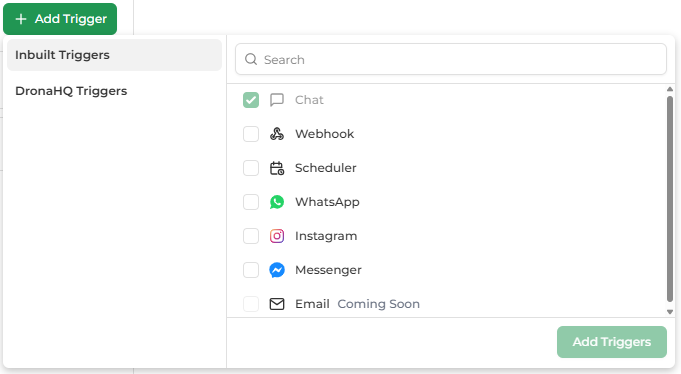
An agent can have one or multiple triggers.
Steps to Add a Trigger
- Open your agent
- Click Add Trigger
- Select one or more trigger types
- Click Add Triggers
Each selected trigger becomes a new entry point to the same agent logic.
Available Trigger Types
Chat
Use this trigger for:
- Manual testing
- Internal conversations
- Quick validation during development
Webhook
Use this trigger when:
- An external system needs to start the agent
- Structured data must be sent to the agent
Examples:
- Form submissions
- Payment events
- CRM or backend workflows
Scheduler
Use this trigger when:
- The agent must run automatically at fixed times
- No user interaction is required
Examples:
- Daily or weekly reports
- Periodic monitoring
- Background maintenance tasks
WhatsApp
Use this trigger when:
- You want users to chat with your agent on WhatsApp
- You need conversational automation
Examples:
- Customer support
- FAQs
- Lead qualification
- Guided workflows
Instagram
Use this trigger when:
- You want users to chat with your agent on Instagram Direct Messages
- You need conversational automation on Instagram
Examples:
- Customer support
- FAQs
- Lead qualification
- Social media engagement
- Guided workflows
Facebook Messenger
Use this trigger when:
- You want users to chat with your agent on Facebook Messenger
- You need conversational automation on Facebook
Examples:
- Customer support
- FAQs
- Lead qualification
- Community management
- Guided workflows
DronaHQ Triggers
Use this trigger when:
- You need to integrate with specific platforms (Gmail, Slack, GitHub, Salesforce, etc.)
- You want to respond to events from external applications automatically
- You need no-code integration with popular services
Examples:
- Email automation (Gmail, Outlook)
- Team collaboration (Slack, Discord)
- Project management (Jira, Asana, Trello)
- CRM automation (Salesforce, HubSpot)
- Development workflows (GitHub)
- File management (Google Drive, OneDrive)
- Calendar automation (Google Calendar)
- Payment processing (Stripe)
- And 145+ more platform integrations
See the DronaHQ Triggers guide for the complete list of available platform triggers.
Coming Soon Triggers 🚧
These triggers are not selectable yet and indicate upcoming platform capabilities:
Once released, these triggers can be added to existing agents without changing agent logic.
Which Trigger Should I Use?
Use this quick guide to choose the right trigger:
| Your Requirement | Recommended Trigger |
|---|---|
| Run agent automatically at fixed times | Scheduler |
| Start agent from another system | Webhook |
| Talk to users in real time | WhatsApp, Instagram, Facebook Messenger |
| Test or chat internally | Chat |
| No user interaction required | Scheduler |
| Event-driven integrations | Webhook |
| Platform-specific automation (Gmail, Slack, GitHub, etc.) | DronaHQ Triggers |
Can an Agent Have Multiple Triggers?
Yes ✅
A single agent can:
- Run on a schedule
- Respond to webhooks
- Chat on WhatsApp, Instagram, or Facebook Messenger
- Monitor Gmail, Outlook, or Slack
- Track GitHub, Jira, or Linear events
- Process Salesforce, HubSpot, or Stripe events
- And much more with DronaHQ Triggers
All triggers share the same agent instructions and tools.
Think of triggers as multiple doors leading to the same agent brain.
Best Practices
- Start with one trigger while building
- Add more triggers as your use case grows
- Reuse the same agent instead of creating duplicates
- Use:
- Scheduler for time-based automation
- Webhook for custom integrations
- Platform triggers (Gmail, Slack, GitHub, etc.) for service-specific automation
- WhatsApp, Instagram, Facebook Messenger for conversations
What's Next?
Explore individual trigger guides for detailed setup and behavior:
- Scheduler Trigger
- Webhook Trigger
- WhatsApp Trigger
- Instagram Trigger
- Facebook Messenger Trigger
- DronaHQ Triggers - 145+ platform-specific integrations