API Keys
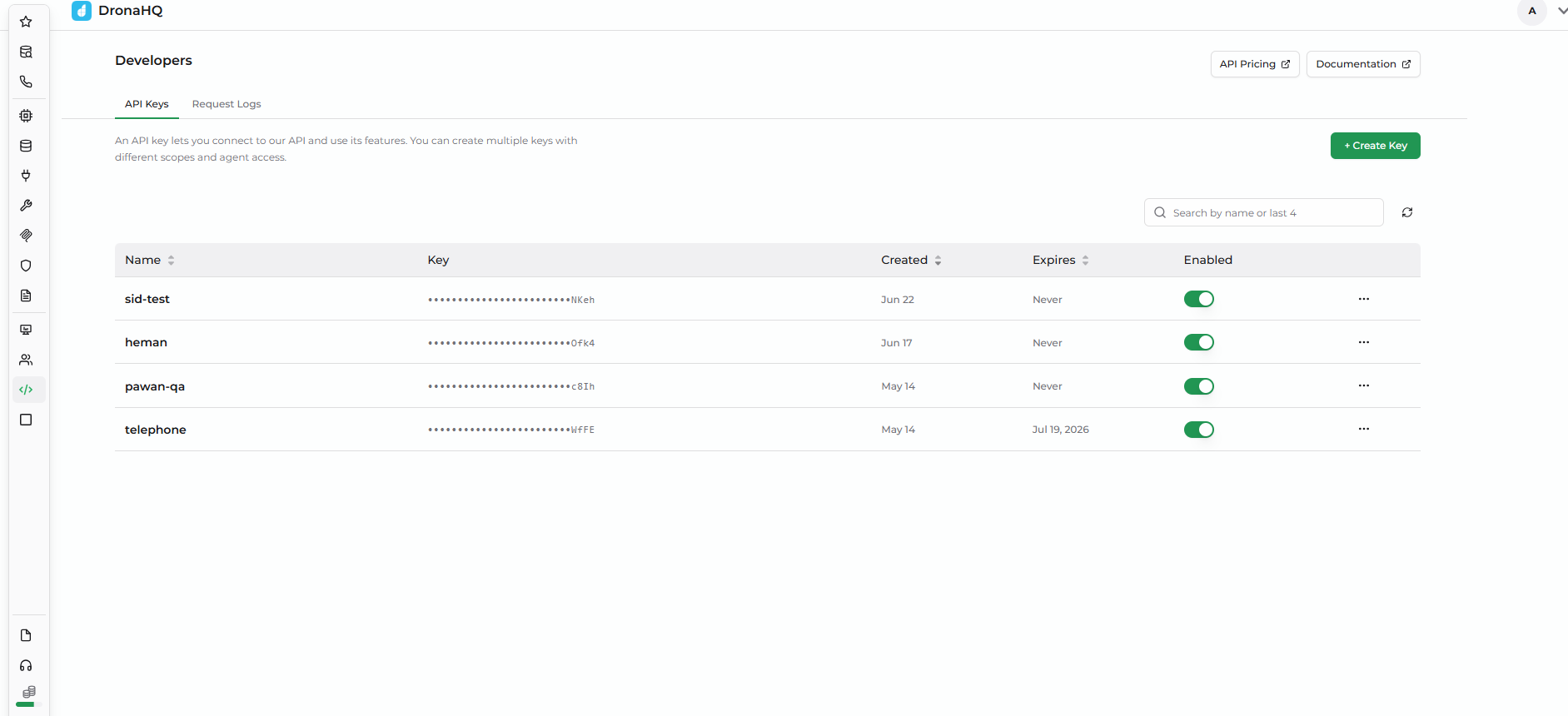
API Keys are workspace-level secrets that let external clients call DronaHQ APIs on behalf of your agents. Each key is a sk_ prefixed token that you scope to one or more agent types and (optionally) to a specific list of agents.
A single key can address Agent, Data Agent, and Voice Agent in any combination — pick the minimum set of scopes the integration actually needs.
Overview
When you generate a key:
- DronaHQ returns the full secret once. After that only the last 4 characters are visible in the UI.
- The key is bound to your workspace and to the Scopes and Agent Access you pick at creation time.
- Every call made with the key is recorded in Request Logs for 30 days.
Creating an API Key
- Go to Developer → API Keys.
- Click New Key.
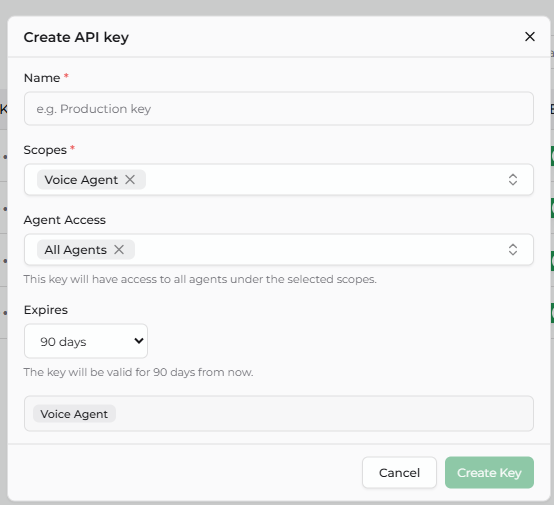
- Fill in the form:
Name
- A friendly label for the key in the UI.
- Examples:
Production backend,CI runner,Zapier integration. - Required field.
Scopes
- One or more of Agent, Data Agent, Voice Agent.
- Scopes are additive — a key with both Agent and Voice Agent can call both.
- Pick the minimum set required by the integration. If the key leaks, a tighter scope limits the blast radius.
- Required field.
Agent Access
- All Agents (default) — the key can target every agent under the selected scopes.
- Or pick a specific subset of agents. The key will be denied access to anything outside that list.
Expires
- Never / 30 days / 90 days / 1 year / Custom date.
- For production keys, prefer a non-Never value so a forgotten key eventually stops working.
Saving and copying the secret
The full sk_... value is shown once, immediately after you click Create. Copy it into your secret store right then.
After you close the dialog, only the last 4 characters are visible — the Key Preview column shows the secret as ••••••••a1b2. If you lose the secret, you cannot recover it; delete the key and create a new one.
Treat the secret like a password. Anyone with the full sk_... value can call your APIs with the same permissions as the key. Never share it in screenshots, support tickets, or public channels.
Using the API Key
Include the key in every request using the api-key header — not Authorization: Bearer.
Header format:
api-key: sk_<your-secret>
Example cURL (dispatching an outbound voice call — see the Outbound Call Dispatch API for the full reference):
curl -X POST https://<your-dronahq-host>/voice/outbound/dispatch \
  -H "api-key: sk_your-generated-secret-here" \
  -H "Content-Type: application/json" \
  -d '{
    "agent_id": "<voice-agent-uuid>",
    "destination_phonenumber": ["+14155551234"]
  }'
If the request goes through a reverse proxy, the backend honors x-forwarded-for so the original caller IP appears in Request Logs.
Managing keys
The API Keys list shows the following columns:
| Column | What it shows |
|---|---|
| Name | The label you set at creation |
| Key Preview | Last 4 characters of the secret (the full value is never shown again) |
| Scopes | The agent types this key can address |
| Agent Access | All Agents, or the count of allowlisted agents |
| Expires | Expiry date, or Never |
| Last Used | Timestamp of the most recent successful auth |
| Enabled | Toggle — controls whether the key authenticates |
Available operations:
- Enable / Disable — flip the Enabled toggle. A disabled key fails auth with
disabledbut is preserved, so its Request Log history stays intact. Use this for temporary lockouts. - Edit — change Name, Scopes, Agent Access, or Expires. The secret itself never changes.
- Delete — hard delete. The key cannot be recovered. There is no rotate operation — to rotate, create a new key, switch traffic over, then delete the old one.
Security Best Practices
- Never commit a key to source control. Store it in a secret manager (Vault, AWS Secrets Manager, Doppler) and inject it at runtime.
- Set an expiry. Time-bound production keys so a forgotten one eventually fails closed.
- Grant least privilege. Use the narrowest Scopes + Agent Access the integration needs.
- Disable before deleting. If you might need to roll back, disable first — Request Logs stay attached to the key.
- Rotate on exposure. On any suspected leak, create a new key, switch traffic, then delete the old one.