What Are Variables?
Variables act as the dynamic memory for your agents, storing and retrieving data to provide crucial context, personalization, and continuity throughout a session. Variables allow agents to retain state and adapt to user interactions.
To retrieve or reference a variable within your components, queries, or UI elements, use the standard double-curly brace notation: {{variable.<name>}}
Key Features
- Dynamic Memory: Maintains session context and continuity.
- Data Security: Value masking in logs to protect sensitive information.
- Global Accessibility: Simple syntax to reference stored data anywhere in the agent execution path.
Any value referenced using the {{variable.*}} syntax is automatically scrubbed from execution traces and system logs to ensure data privacy and security compliance.
Adding Variables
You can define and manage your variables through the platform interface using the configuration table.
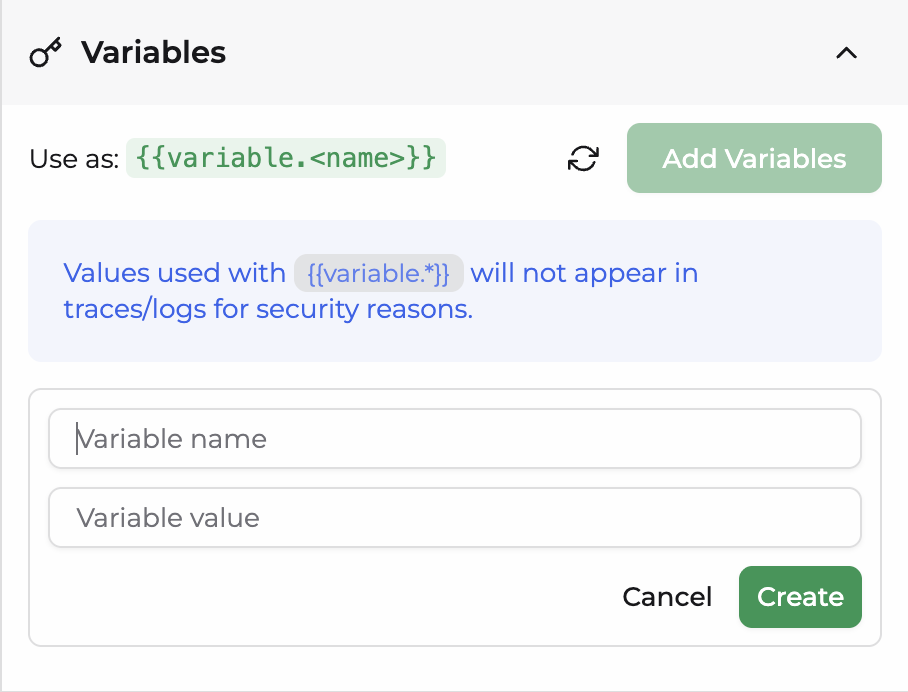
| Property | Description | Requirement |
|---|---|---|
| Variable Name | The unique identifier used to reference the variable in code or UI expressions. | Required |
| Variable Value | The initial data or dynamic expression assigned to the variable. | Required |
Runtime Overrides via Secure Embed (JWT)
The variables object allows you to pass runtime values from your backend applications directly into the agent during initialization.
When a key inside the variables object matches a variable already defined in the agent's variables section, the JWT value takes precedence and overrides it for that specific session. This ensures secure, user-specific data injection without exposing parameters on the frontend. For detailed implementation steps, refer to the Secure Embed Documentation.
Webhook Variable Overrides
Variables can be dynamically overridden during an active session via incoming webhooks.
When an external system triggers a webhook configured for your agent, it can pass new values to existing variables. This payload temporarily replaces the default or initial value of the variable for that specific execution flow, enabling real-time, event-driven context updates.
Practical Examples
1. Storing User Context
To personalize an agent's response, you can store the logged-in user's first name.
Variable Name: user_name
Variable Value: John
Usage: Hello {{variable.user_name}}, how can I help you today?
2. Maintaining Session Continuity
Track the current status of a customer support ticket within the agent execution loop.
Variable Name: ticket_status
Variable Value: In Progress
Usage: The current status of your request is {{variable.ticket_status}}.
3. Passing Secure Data to Tool Parameters
When connecting agents to external APIs or database tools, you often need to pass sensitive credentials or tokens. Using variables ensures these parameters are executed securely without exposure.
Variable Name: api_secret_key
Variable Value: sk_live_51Nz...
Usage in Tool Parameter: Bearer {{variable.api_secret_key}}
Security Benefit: The actual secret key will be masked and will not appear in any execution traces or debugging logs.
Frequently Asked Questions (FAQ)
What are variables in an agentic platform?
Variables act as the dynamic memory for AI agents. They store and retrieve data throughout a user session to provide context, personalization, and continuity.
Developers use them to pass data across different agent components, UI elements, and backend tools.
How do I use or reference a variable?
You can reference any defined variable across your agent workflows using the standard double-curly brace syntax: {{variable.variable_name}}.
This expression pulls the stored runtime or session value instantly into your prompts, components, or tool parameters.
Are variable values visible in system logs or traces?
No. For security and privacy compliance, any value referenced using the {{variable.*}} syntax is masked and scrubbed from execution traces, system tracking, and debugging logs.
This allows you to pass sensitive data safely.
How do I pass secure information into an agent's tool parameters?
You can create a variable specifically for credentials (such as an API key or session token) and assign the secret value to it.
When configuring your tool parameters, reference it using {{variable.your_secret_key}}.
The system executes the tool with the correct key while keeping it hidden from frontend traces and logs.
Can I override agent variables from a backend application?
Yes. When using a Secure Embed via a JSON Web Token (JWT), the variables object lets you pass runtime values directly from your backend into the agent.
If a key inside your backend variables object matches a variable defined in the agent's variables panel, the JWT value takes precedence and overrides it for that specific session.
How do webhook overrides work with variables?
When an external system triggers a webhook connected to your agent, the incoming payload can contain keys matching your pre-defined variables.
The platform automatically catches these values and overrides the variable data in real time, enabling event-driven agent behavior based on external database or system updates. For detailed implementation steps, refer to the Secure Embed Documentation.