Overview
The Evals and Datasets features work together to give you a complete, automated evaluation pipeline for your AI agents. Datasets provide the structured test cases; Evals run those test cases and produce scored, trackable results. Together, they let you benchmark agent performance, catch regressions, and continuously improve your prompts and configurations — all from a single unified dashboard.
Before diving into configuration, it helps to understand the core lifecycle of an evaluation:
- Datasets & Test Cases — The ground-truth inputs and expected outputs used to stress-test your AI agent.
- Reviewer Types — The judges (LLMs, code scripts, or humans) that score the agent's actual output against each test case.
- Scoring — Quantitative metrics (0% to 100% or absolute weights) aggregated into an overall quality benchmark.
Datasets
A Dataset is a curated collection of test cases used within Evals to evaluate, benchmark, and measure your AI agent's performance. Running Evals against a standardized dataset lets you objectively track how changes to your agent's prompts, tools, or underlying model impact its real-world accuracy and reliability.
Dataset Schema
| Field | Type | Description |
|---|---|---|
| Name | String | A unique, identifiable name for the dataset. |
| Description | String | Contextual information about what scenario or edge case this dataset tests. |
| Test Cases | Array / Object | The actual collection of inputs and expected outputs used during evaluation. |
| Updated | Timestamp | Auto-generated date and time indicating when the dataset was last modified. |
Creating a New Dataset
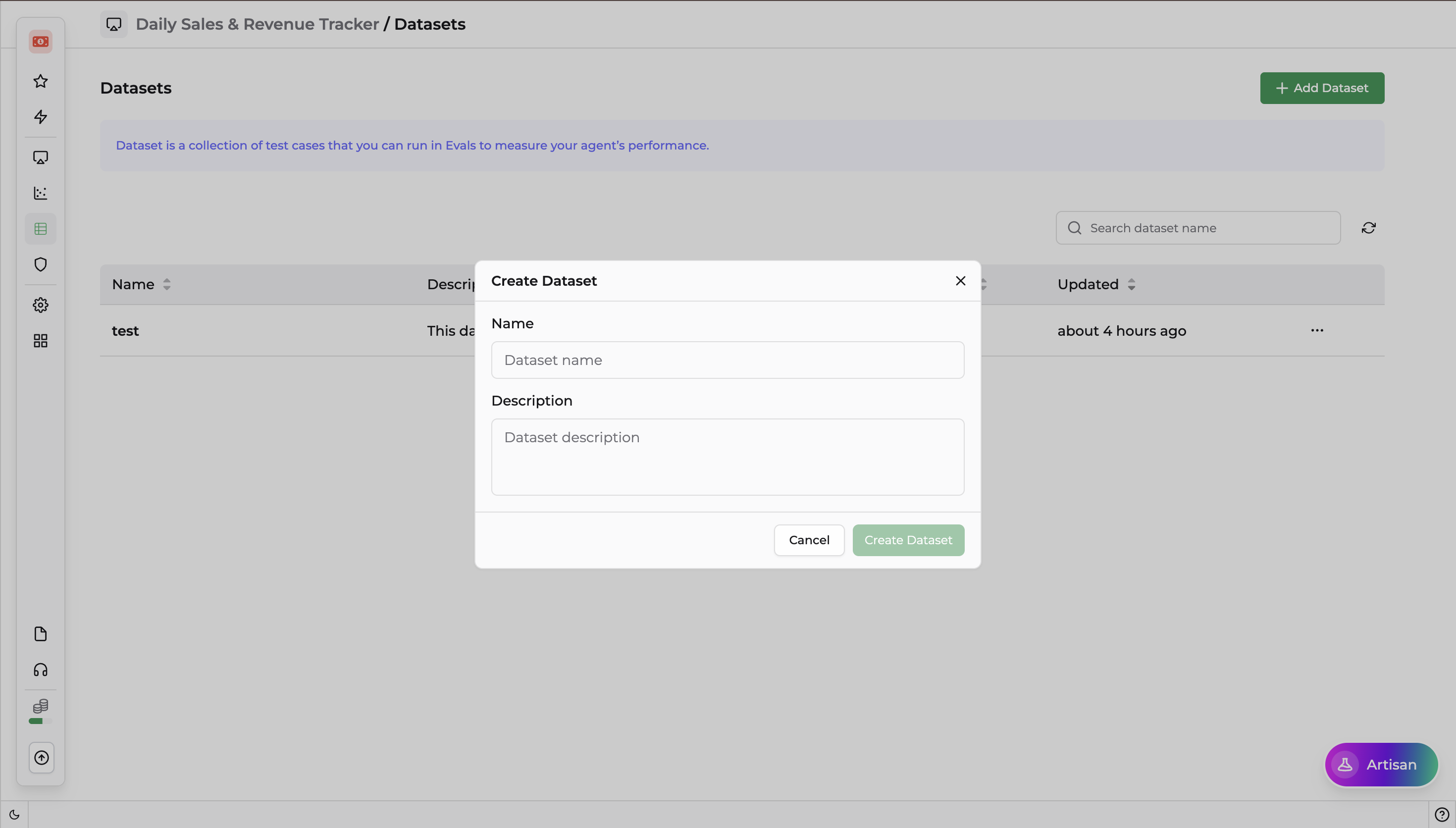
Navigate to the Evals or Datasets section from your DronaHQ left navigation panel.
Click + Create New or Add Dataset.
In the configuration modal, define the following:
- Name — Enter a clear, concise name.
- Description — Describe what this dataset is intended to validate.
Click Save or Create.
Adding Test Cases to a Dataset
A Test Case defines a specific scenario used to evaluate how your AI agent responds to a given input. Well-constructed test cases ensure your agent consistently invokes the right tools and delivers accurate final answers.
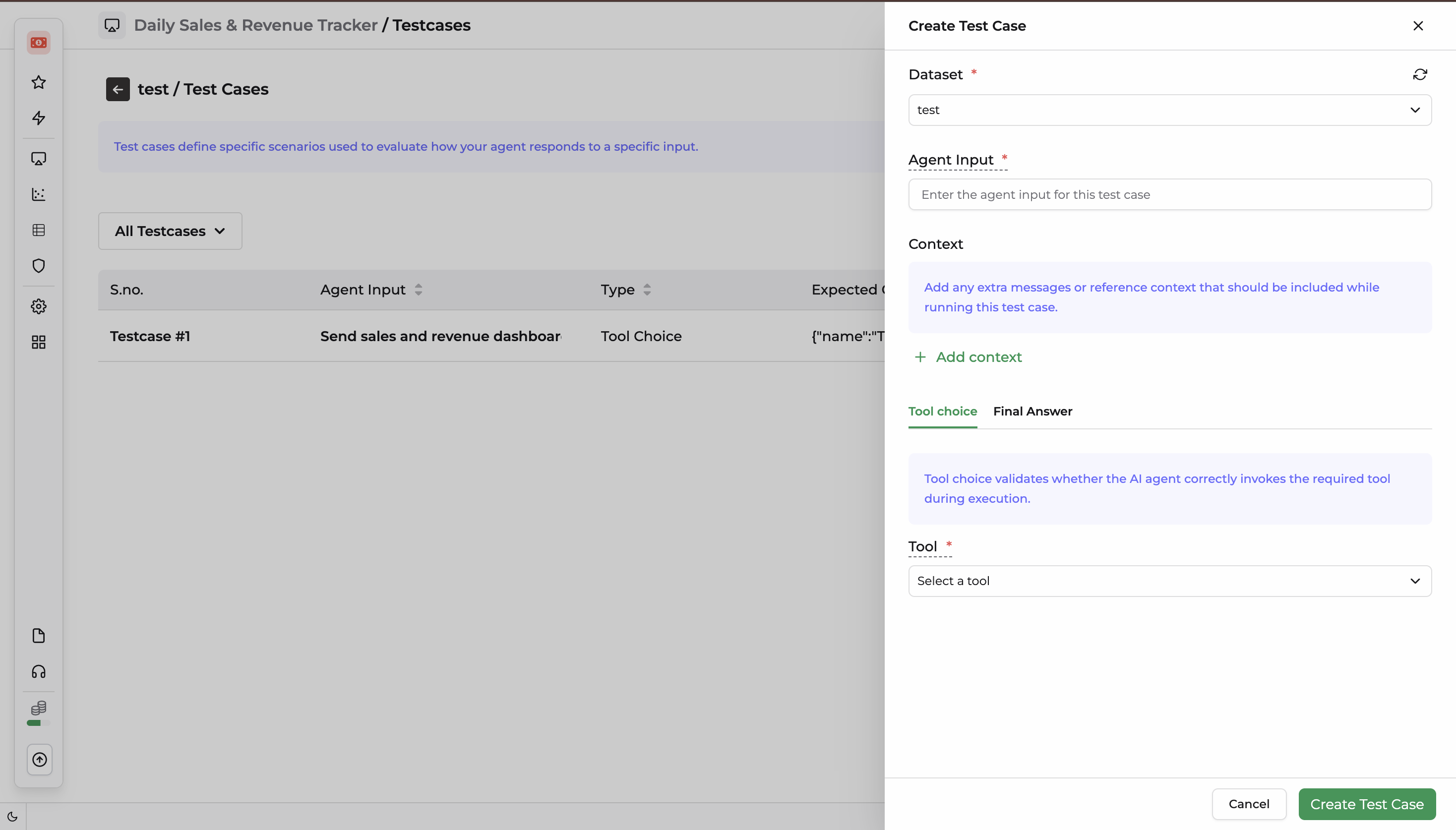
| Component | Description |
|---|---|
| Dataset | The name of the parent dataset this test case belongs to. |
| Context | Extra messages, system instructions, or reference background context injected when running this specific test case. |
| Tool Choice | Configures and validates whether the AI agent correctly identifies and invokes the required tool during execution. |
| Final Answer | Specifies the evaluation criteria and assigns a Reviewer to score the agent's ultimate response. |
Steps to Create a Test Case
- Verify Dataset — Ensure the correct dataset name is selected at the top of the form.
- Add Context — Provide any extra system messages or background data the agent needs for this scenario.
- Select a Tool — Specify exactly which tool the agent must invoke during the run.
- Final Answer — Add a Reviewer to evaluate and score the final answer.
- Click Create Test Case to commit the scenario, or Cancel to exit.
Reviewer Types
Reviewers act as the evaluation engine, automatically scoring the agent's output against your defined criteria. The table below covers all available reviewer types, organized by category.
| Reviewer | Category | Description |
|---|---|---|
| Exact Match | Deterministic | Validates whether the agent's final response exactly matches the expected target string. |
| String Contains | Deterministic | Checks if a specific substring or keyword is present within the agent's response. |
| Regex | Deterministic | Evaluates the response against a custom Regular Expression pattern. |
| Valid JSON | Format Validation | Ensures the agent's output is a properly formatted, parsable JSON object. |
| Valid XML | Format Validation | Ensures the agent's output is a properly formatted, parsable XML structure. |
| JSON Schema Match | Format Validation | Validates the agent's JSON output against a specific, predefined structural schema. |
| Levenshtein Distance | Heuristic | Measures the character-level similarity (edit distance) between the agent's answer and the expected answer. |
| Tone Detection | AI-Driven | Analyzes the emotional tone (e.g., professional, empathetic) of the agent's response. |
| Factuality | AI-Driven | Cross-references the response against the provided context to ensure no hallucinations occurred. |
| Closed QA | AI-Driven | Evaluates whether the agent correctly answered a specific question based on explicit criteria. |
| Match Expected Answer | AI-Driven | Uses an LLM to semantically compare the agent's response to a target ground truth, ignoring minor phrasing differences. |
| Custom LLM Judge | AI-Driven | Allows you to write a custom prompt or instruction set to grade the agent's response. |
Evals
The Evals control provides a comprehensive overview of all historical and active evaluation runs. It allows developers to monitor performance trends and pinpoint exactly where an agent is failing.
Eval Dashboard Fields
| Field | Type | Description |
|---|---|---|
| Name | String | The unique, developer-assigned name of the evaluation run. |
| Average Score | Percentage / Number | The aggregated performance score across all test cases in the dataset. |
| Status | Badge / Status | The current state of the evaluation (see Filter Options below). |
| Dataset | String / Tag | The specific dataset(s) targeted during this evaluation execution. |
| Runs | Integer | The total number of individual test case executions within the eval. |
| Last Run | Timestamp | The date and time when the evaluation was last triggered. |
Filter & View Options
| View | Description |
|---|---|
| All Evals | Displays the complete history of all evaluation runs. |
| Running | Shows live evaluations currently executing test cases. |
| Completed | Displays successfully completed evaluations with final scores available for analysis. |
| Failed | Shows evaluations aborted due to system timeouts, missing API keys, or infrastructure crashes. |
| Error | Highlights specific test cases or processes that returned bad payloads or code exceptions. |
Running a New Evaluation
To execute a benchmark against your AI agent, trigger a new evaluation instance directly from the UI or via a platform event action.
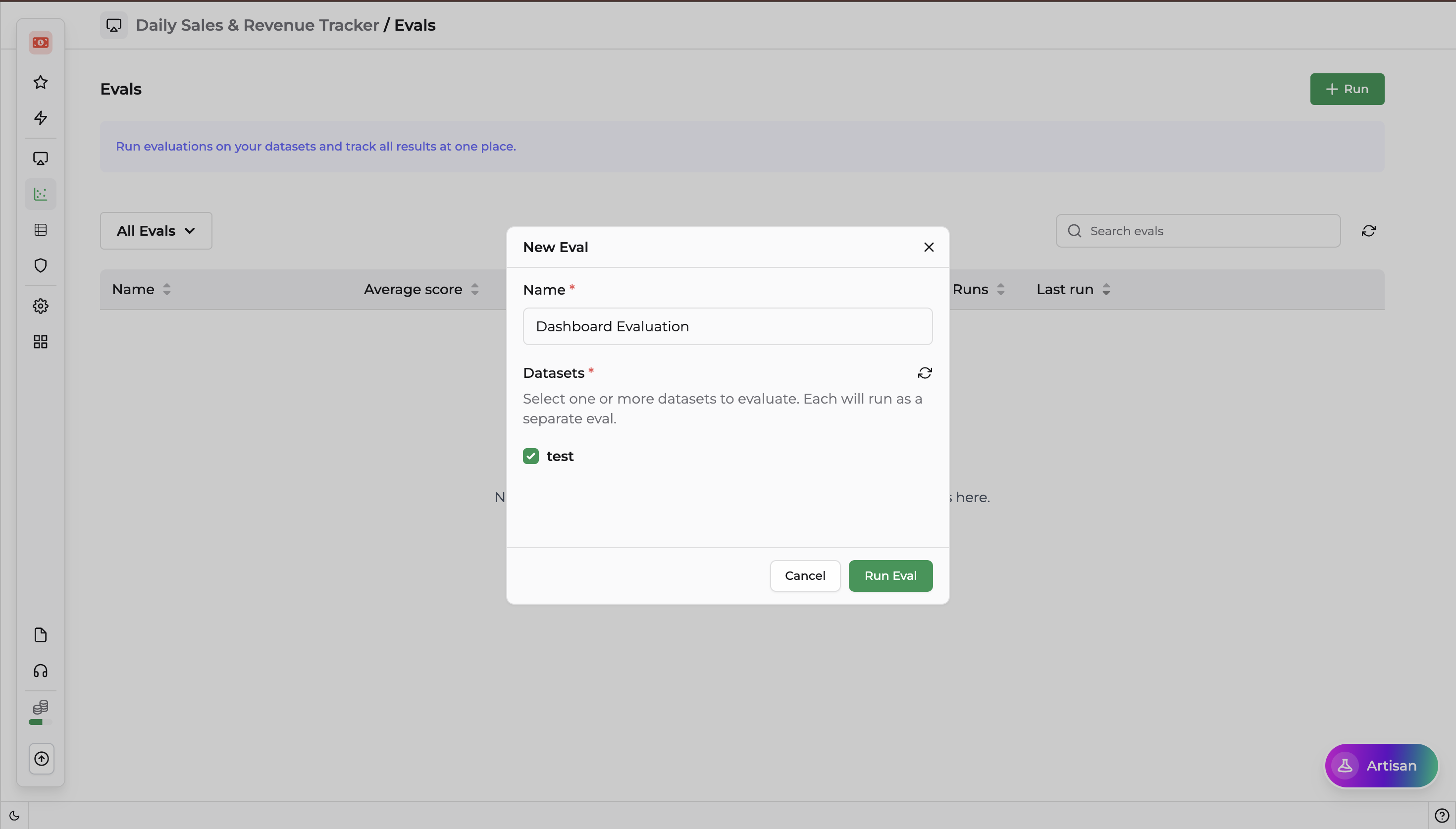
- Name — Enter a name for the new evaluation run.
- Datasets — Select one or more pre-configured datasets to evaluate.
Note: You can create evaluation datasets to assess performance on targeted use cases. Refer to the Datasets section above for instructions.
Click Run Eval to queue the process, or Cancel to discard.
Interpreting Results and Improving Your Agent
Once an evaluation completes, use the dashboard to drive iterative improvement:
Identify Low Average Scores
Sort by Average Score ascending to immediately find underperforming agent versions.
Debug Failures and Errors
Filter by Error to locate hard crashes such as context window overflow or rate-limiting issues.
Optimize Prompts and Hyperparameters
When a low score appears, adjust your agent's system prompt or temperature settings, run a new Eval, and compare the two runs side-by-side on your dashboard to verify improvement.
Frequently Asked Questions(FAQs)
What is the purpose of Evals?
Evals automate the testing and benchmarking of AI agents using datasets and scoring metrics, giving you an objective, reproducible measure of agent quality over time.
What is a Dataset?
A Dataset is a curated collection of test cases — inputs and expected outputs — used to stress-test your AI agent. Standardized datasets let you track how prompt, tool, or model changes affect real-world accuracy and reliability.
What is a Test Case?
A Test Case defines a specific scenario, input, and evaluation criteria to assess an agent's response. It includes context, tool invocation requirements, and the criteria (via a Reviewer) used to score the final answer.
What does the Average Score represent?
It shows the aggregated performance score across all test cases in an evaluation run, expressed as a percentage or absolute value.
What statuses can an evaluation have?
An evaluation can be Running, Completed, Failed, or Error.
What is the role of a Reviewer?
A Reviewer automatically scores the agent's output against predefined validation criteria. Reviewers can be deterministic (e.g., exact match, regex), format-based (e.g., valid JSON), heuristic (e.g., Levenshtein distance), or AI-driven (e.g., factuality, custom LLM judge).
What types of Reviewers are available?
Twelve reviewer types are available across four categories: Deterministic, Format Validation, Heuristic, and AI-Driven. See the Reviewer Types section for the full breakdown.
How do I run a new evaluation?
Select one or more datasets, provide a name for the eval run, and click Run Eval.
How can Evals help improve my AI agent?
Evals identify low-performing areas, surface hard failures and errors, and let you compare evaluation runs side-by-side after making prompt or configuration changes — creating a tight, data-driven improvement loop.