Overview
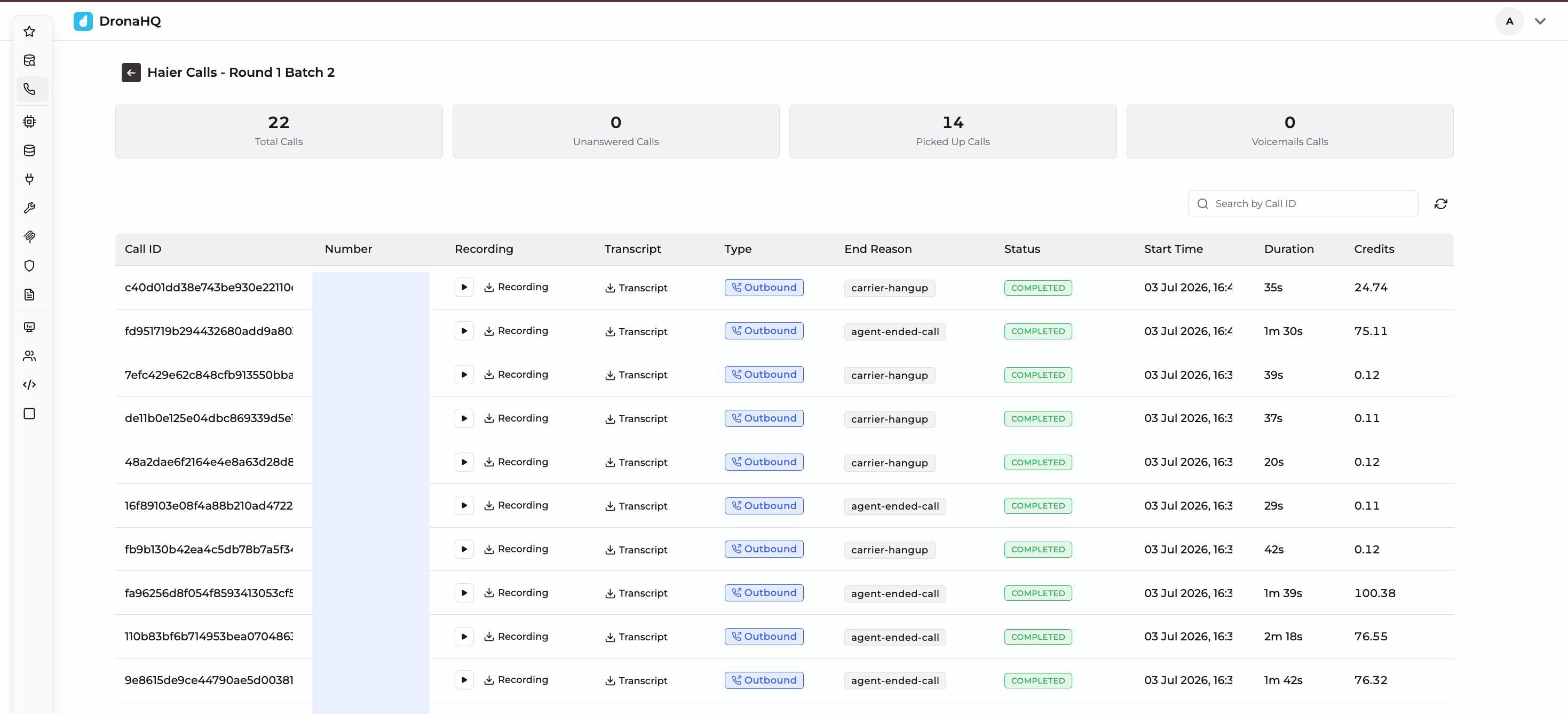
The Campaign Overview page is the results dashboard for a completed or in-progress campaign. It surfaces high-level performance metrics alongside a searchable, call-by-call breakdown—including recordings, transcripts, and end reasons—so you can quickly gauge how well a campaign performed and drill into individual calls when needed.
Key benefits
- At-a-glance metrics: Instantly see total calls, ended calls, pick-up rate, and voicemail count for a campaign.
- Full call transparency: Every call includes its recording, transcript, type, end reason, status, timing, and credit usage.
- Searchable call logs: Quickly locate a specific call using its Call ID.
- Live refresh: Pull the latest call statuses for campaigns still in progress.
Campaign summary metrics
At the top of the page, each campaign displays four key summary tiles:
| Metric | Description |
|---|---|
| Total Calls | The total number of contacts dialed as part of the campaign. |
| Ended Calls | Calls that have finished, regardless of outcome (connected, failed, no-answer, etc.). |
| Picked Up Calls | Calls where the recipient answered and the agent connected. |
| Voicemail Calls | Calls that were routed to or detected as voicemail. |
Use the refresh icon near the search bar to pull the latest counts while a campaign is still running.
Call log table
Below the summary tiles, the call log lists every call placed in the campaign with the following columns:
- Call ID: Unique identifier for the call; use the Search by Call ID field to look up a specific record.
- Number: The recipient's phone number that was dialed.
- Recording: Play the call audio inline or download the recording file.
- Transcript: Download a text transcript of the conversation.
- Type: The call direction (e.g., Outbound, Web).
- End Reason: Why the call ended, such as:
carrier-hangup: The recipient's carrier or device ended the call.agent-ended-call: The voice agent ended the call after completing its objective.no-answer: The call was not picked up.
- Status: The final outcome of the call:
COMPLETED: The call connected and ran to completion.FAILED: The call did not connect (e.g., no answer).
- Start Time: Date and time the call was initiated.
- Duration: Length of the call (e.g.,
25s,1m 30s); failed calls show0s. - Credits: The number of platform credits consumed by the call.
Reviewing individual calls
- Click the play icon next to a Recording to listen to the call directly in the browser, or select Recording to download the audio file.
- Select Transcript to download the full text transcript of the conversation.
- Use Search by Call ID to jump directly to a specific call record when investigating an issue or verifying an outcome.
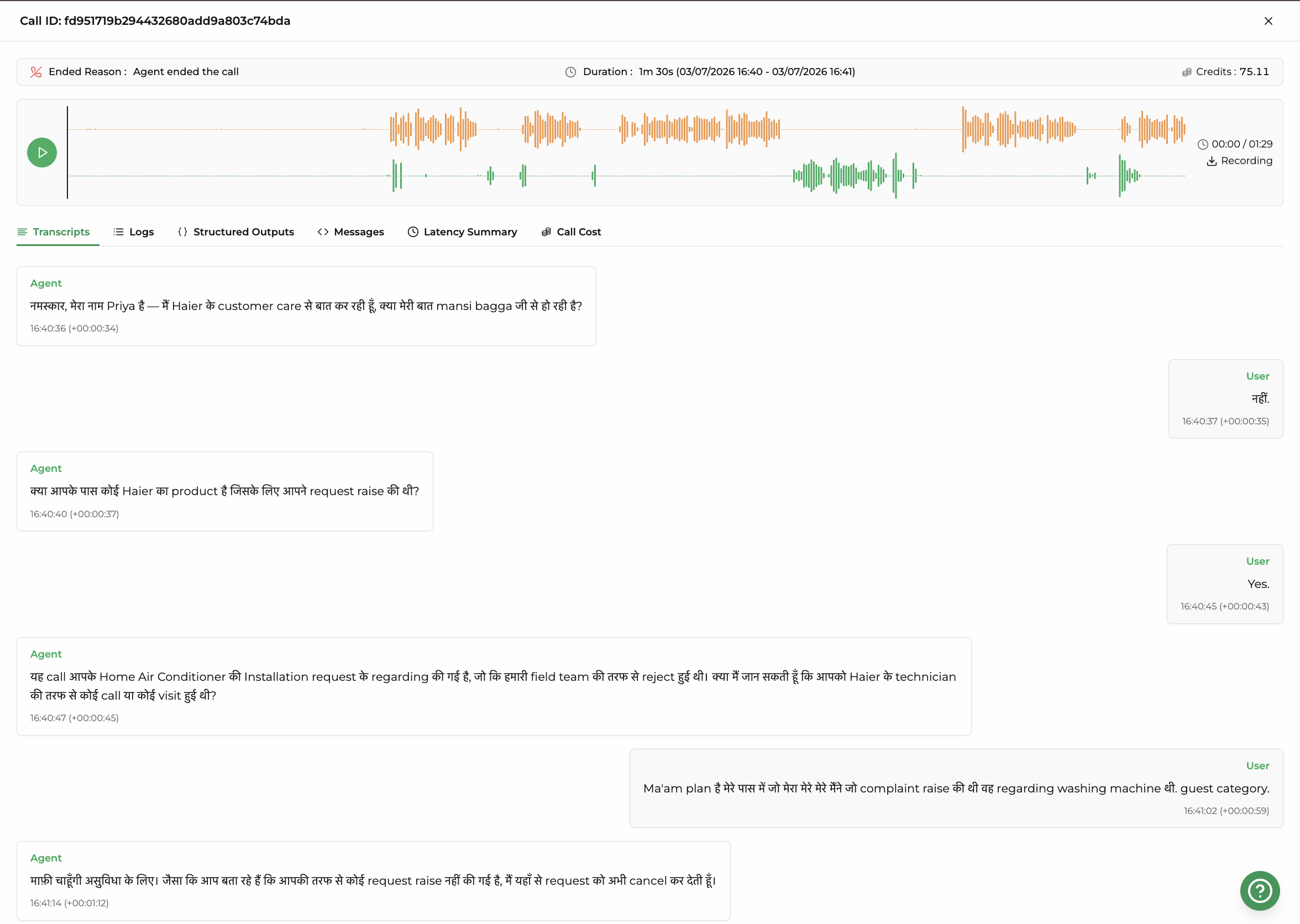
Clicking into a call opens a detailed call view, showing the Call ID, Ended Reason, Duration (start and end timestamps), Credits consumed, and an inline audio player for the recording.
Below this summary, the call is broken down into the following tabs:
Transcripts
The full text transcript of the conversation between the caller and the voice agent, turn by turn.
Logs
A chronological, technical log of everything that happened during the call, useful for debugging call flow, agent decisions, and system events.
Structured Outputs
Any structured data (e.g., JSON fields) extracted by the agent during the call, such as captured answers, classifications, or values pulled from the conversation for downstream use.
Messages
The raw message-by-message exchange between the agent and the system components (e.g., model prompts and responses) that drove the conversation.
Latency Summary
A breakdown of response latency at each stage of the call pipeline, helping identify where delays occurred during the conversation.
Call Cost
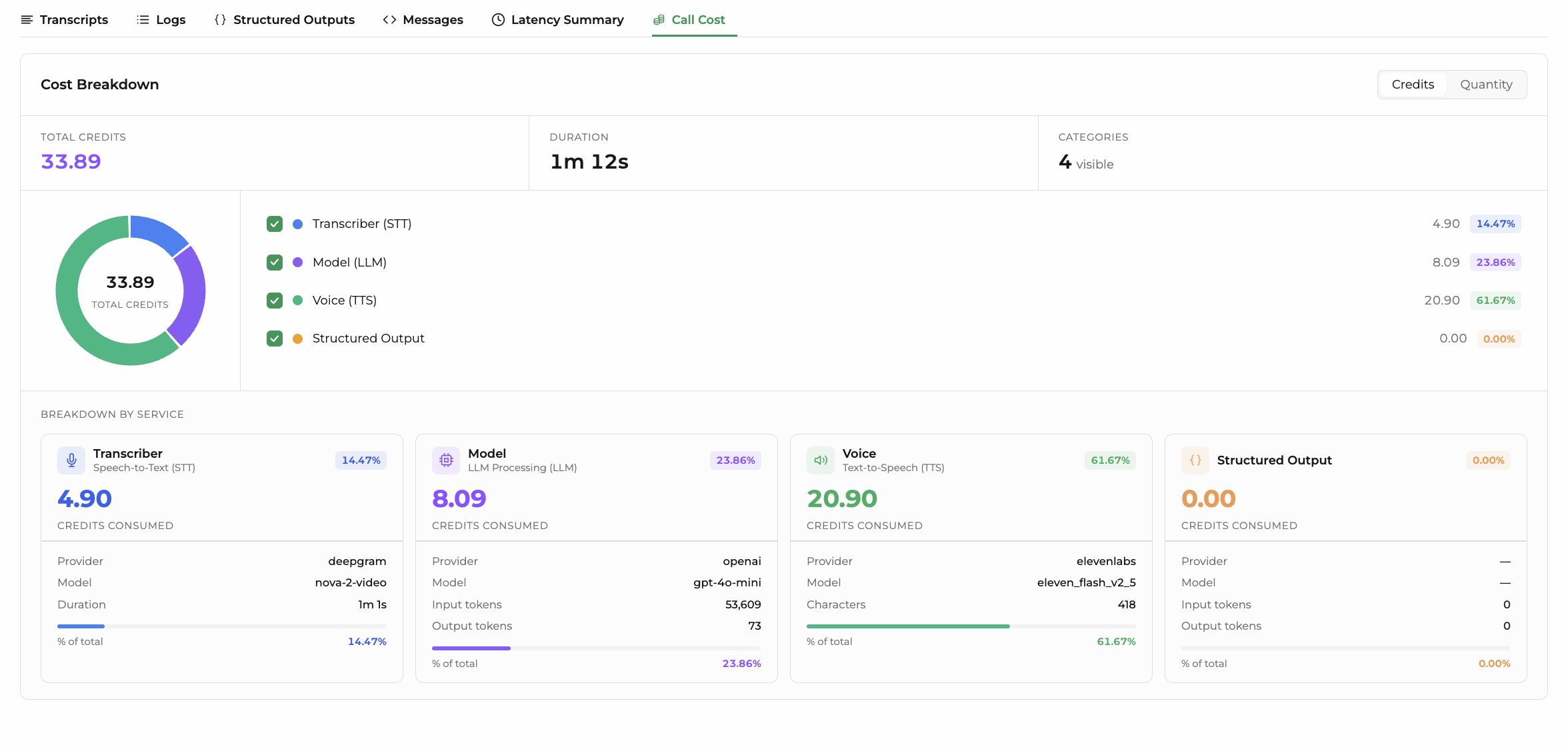
A detailed Cost Breakdown for the call, including:
- Total Credits consumed and call Duration.
- A visual donut chart showing the proportion of credits spent per category.
- A per-category breakdown across up to four cost centers:
- Transcriber (STT): Speech-to-text processing costs, including provider, model, and duration.
- Model (LLM): Language model processing costs, including provider, model, input tokens, and output tokens.
- Voice (TTS): Text-to-speech costs, including provider, model, and character count.
- Structured Output: Cost of extracting structured data, including provider, model, input tokens, and output tokens.
Each category can be toggled on/off to isolate its contribution, and costs can be viewed either in Credits or Quantity (raw units like tokens/characters) using the toggle at the top of the panel.
Tips for analyzing campaign performance
- Compare Picked Up Calls against Total Calls to gauge your overall connect rate.
- Review calls with FAILED status and a
no-answerend reason to identify contacts that may need a retry or a different calling window. - Spot-check transcripts and recordings on
agent-ended-calloutcomes to confirm the agent is completing conversations as expected. - Track Credits per call alongside duration to understand cost efficiency across a campaign.
Reading these numbers from the API
The same summary metrics are available programmatically from GET /voice/campaigns/{campaign_uuid} — see the Campaign API.
Two things to know before you build on that response:
- Counts keep moving after a campaign is stopped or paused. Calls already connected run to their natural end and still record their outcomes, so the totals settle for a few minutes after the status changes. A campaign is not necessarily finished the moment it stops being
running. call_registryholds one record per call ATTEMPT, not one per contact. A contact that was retried appears once per retry. Group bycontact_indexto get back to one row per person.
The call log table and the call detail tabs above are available too:
GET /voice/campaigns/{campaign_uuid}/attempts— List attempts: every row of the call log, paged, plus the contacts that were never dialed and why.GET /voice/calls/{call_id}and one endpoint per tab — the Call Data API: the transcript, logs, structured outputs, messages, latency, cost, and the recording file itself.
What's Next
- Campaign Quickstart — create, schedule, and launch a campaign
- Campaign API — create and control campaigns from your own systems
- Call Data API — read transcripts, structured output, cost, and recordings programmatically