Overview
The Transcriber is the Speech-to-Text (STT) layer of a Voice Agent — it converts the caller's spoken audio into text before it reaches the LLM. This document covers how to choose a Transcriber Provider and Model.
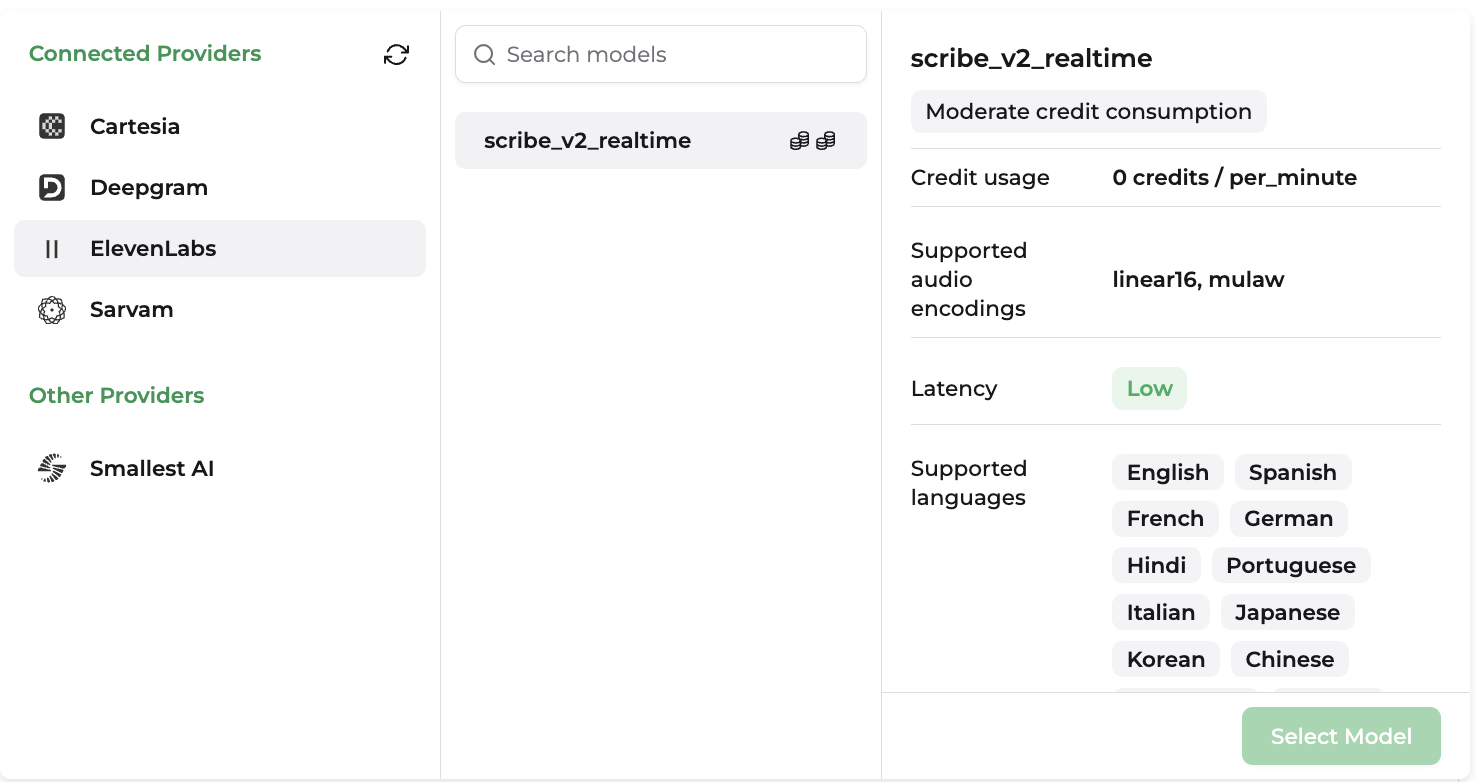
Model Parameters
| Parameter | Description |
|---|---|
| Credit usage | How much of your usage quota is consumed per unit of audio transcribed (typically billed per second or per minute); varies by model tier. |
| Supported Audio Encodings | The input audio formats the model can accept for transcription: linear16, mulaw, alaw, opus, mp3, flac, ogg, webm. |
| Latency | How quickly the model returns a transcript after receiving audio — critical for how responsive a voice agent feels. |
| Supported Languages | The languages and accents the model can transcribe. |
Providers
Cartesia
| Model Name | Model ID |
|---|---|
| Ink Whisper | ink-whisper |
Ink 2 is English-only and includes native turn detection (start/end-of-turn signals). Ink Whisper supports additional languages and is used automatically when a non-English language is set.
Deepgram
| Model Name | Model ID |
|---|---|
| Flux General (English) | flux-general-en |
| Flux General (Multilingual) | flux-general-multi |
| Nova 3 | nova-3 |
| Nova 3 General | nova-3-general |
| Nova 3 Medical | nova-3-medical |
| Nova 2 | nova-2 |
| Nova 2 Conversational AI | nova-2-conversationalai |
| Nova 2 General | nova-2-general |
| Nova 2 Medical | nova-2-medical |
| Nova 2 Phone Call | nova-2-phonecall |
| Nova 2 Meeting | nova-2-meeting |
| Nova 2 Finance | nova-2-finance |
| Nova 2 Automotive | nova-2-automotive |
| Nova 2 Drive-Thru | nova-2-drivethru |
| Nova 2 Video | nova-2-video |
| Nova 2 Voicemail | nova-2-voicemail |
| Nova | nova |
| Nova General | nova-general |
| Nova Medical | nova-medical |
| Nova Phone Call | nova-phonecall |
| Enhanced | enhanced |
| Enhanced General | enhanced-general |
Deepgram's domain-tuned models (e.g. -medical, -phonecall, -finance, -automotive, -drivethru) are trained on vocabulary specific to that domain, and each model has its own supported-language coverage — most Nova 2 domain variants are English-only, while Nova 3 and Flux extend to multilingual transcription.
ElevenLabs
| Model Name | Model ID |
|---|---|
| Scribe v2 Realtime | scribe_v2_realtime |
Scribe v1 is deprecated and scheduled for removal on July 9, 2026. Scribe v2 is built for batch/long-form transcription (diarization, entity detection), while Scribe v2 Realtime is optimized for low-latency, real-time agent use.
Sarvam
| Model Name | Model ID |
|---|---|
| Saaras v3 | saaras:v3 |
Sarvam has different behavior for each model — Saarika v2.5 always transcribes in the spoken language, while Saaras v3 additionally supports transcribe, translate, verbatim, translit, and codemix modes via a mode parameter. Saarika v1, v2, and the flash variant, along with Saaras v2.5, are deprecated in favor of these two.
Smallest AI
| Model Name | Model ID |
|---|---|
| Pulse | pulse |
Pulse supports automatic language detection across 17 streaming and 26 pre-recorded languages.
Basic Settings
Some speech models expose additional runtime settings that let you fine-tune how the voice agent behaves. The available settings depend on the provider and model you select, so not every option will appear for every model.
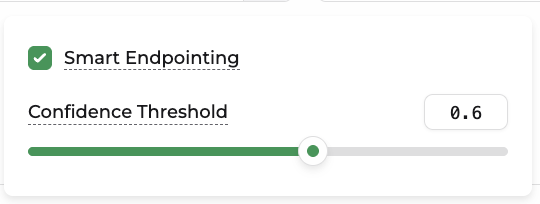
| Setting | Description |
|---|---|
| Smart Endpointing | Automatically detects natural pauses and sentence boundaries to determine when to finish generating speech. This helps create more natural conversations while reducing interruptions and unnecessary latency. |
| Confidence Threshold | Sets the minimum confidence required before the model commits to an endpoint or speech decision. Lower values can make responses feel faster but may increase the chance of premature cutoffs, while higher values favor accuracy at the cost of slightly higher latency. |
Model settings are model-specific. The options shown in the Voice configuration panel will vary depending on the selected provider and model.