Overview
When configuring a Voice for a Voice Agent, the first step is to choose a Provider, and then a Model from that provider.
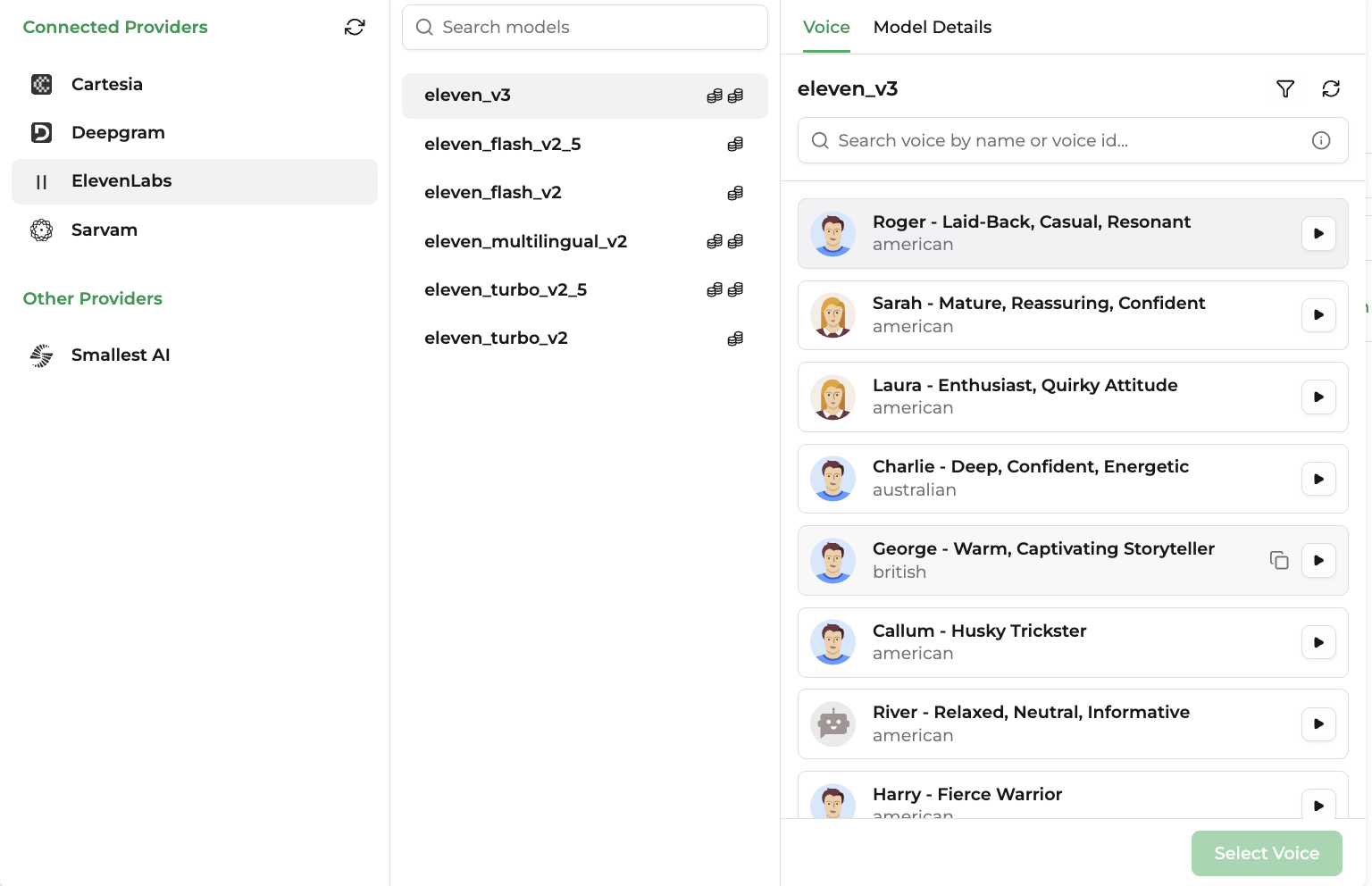
Speed, emotion, pacing, and chunking all shape how natural the speech feels and how quickly the agent responds — the difference between a caller who stays on the line and one who hangs up.
Model Parameters
Every model on the platform is described using the following parameters. Use these to compare models within a provider, or across providers, before making a selection.
| Parameter | Description |
|---|---|
| Credit usage | How much of your usage quota is consumed per unit of audio generated (typically billed per character or per minute); varies by model tier. |
| Supported Output Formats | The audio encodings/containers the model can return (e.g. MP3, WAV, PCM, μ-law), used to match your telephony or playback pipeline. |
| Latency | How quickly the model starts returning audio after receiving text — the key factor in how "real-time" a voice agent feels. |
| Supported Languages | The languages and accents the model can generate speech in. |
Providers
Cartesia
| Model Name | Model ID |
|---|---|
| Sonic | sonic |
| Sonic Turbo | sonic-turbo |
| Sonic 2 | sonic-2 |
| Sonic 2 (2025-06-11) | sonic-2-2025-06-11 |
| Sonic 3 | sonic-3 |
| Sonic 3 (2025-10-27) | sonic-3-2025-10-27 |
| Sonic 3 (2026-01-12) | sonic-3-2026-01-12 |
Extra Cartesia voices library voice can be added by entering the voice ID directly into the Voice panel search bar. This feature is available only when Cartesia is configured with your own API key. :::
Sonic 3 is Cartesia's latest generation TTS model. Routes to the latest stable snapshot. Supports SSML voice controls (speed, volume, emotion), laughter tags, 42 languages, and voice cloning. :::
Deepgram
| Model Name | Model ID |
|---|---|
| Aura | aura |
| Aura 2 | aura-2 |
Deepgram has different voices for each model. Deepgram voice IDs embed the model name directly (e.g. aura-2-thalia-en), so switching models changes the list of voices available for selection.
ElevenLabs
| Model Name | Model ID |
|---|---|
| Eleven Multilingual v2 | eleven_multilingual_v2 |
| Eleven Turbo v2 | eleven_turbo_v2 |
| Eleven Turbo v2.5 | eleven_turbo_v2_5 |
| Eleven Flash v2 | eleven_flash_v2 |
| Eleven Flash v2.5 | eleven_flash_v2_5 |
| Eleven v3 | eleven_v3 |
Extra ElevenLabs voices can be added by entering the voice ID directly into the Voice panel search bar. This feature is available only when ElevenLabs is configured with your own API key.
Sarvam
| Model Name | Model ID |
|---|---|
| Bulbul v2 | bulbul:v2 |
| Bulbul v3 | bulbul:v3 |
Sarvam has different voices for each model. Bulbul v2 and Bulbul v3/v3-beta each have their own separate voice catalog — switching models changes the list of voices available for selection.
Smallest AI
| Model Name | Model ID |
|---|---|
| Lightning v3.1 | lightning_v3.1 |
Smallest AI also lists voices per model, so the voice catalog will differ depending on which Lightning model version is selected.
Voice Settings
After selecting a voice, you can customize how it sounds using Voice Settings. These controls let you adjust the characteristics of the generated speech without changing the underlying voice.
Available voice settings depend on the selected provider, model, and voice. Some providers expose additional controls such as volume, speed
| Setting | Description |
|---|---|
| Speed | Controls how quickly the voice speaks. Lower values produce slower, more deliberate speech, while higher values increase speaking rate. |
| Volume | Adjusts the loudness of the generated audio without changing the selected voice. |
| Pitch | Changes the perceived highness or lowness of the voice while preserving the speaker's identity. Available only on supported models. |
| Emotion / Style | Applies expressive speaking styles such as happy, calm, excited, or sad, where supported by the model. |
| Pronunciation / SSML Controls | Some models support SSML or provider-specific controls for pronunciation, pauses, emphasis, laughter, and other speech effects. |
| Additional Voice Controls | Providers may expose other voice-specific settings, such as stability, similarity, expressiveness, or style intensity. These controls are only available on models that support them. |