Overview
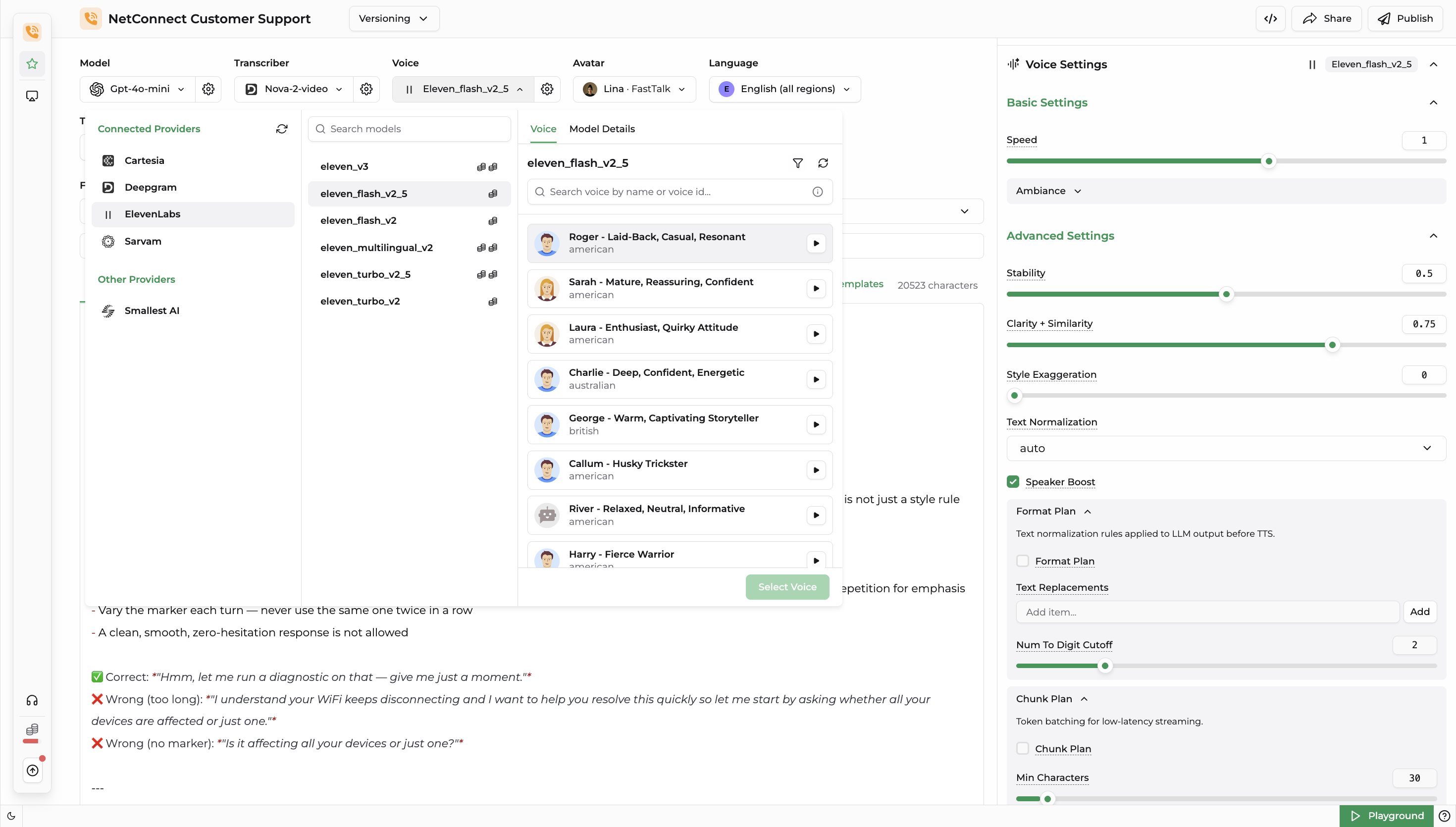
Once a Model is selected, the Voice Settings panel opens for that model. This document covers the settings available in this panel and what each one controls.
info
The Voice Settings panel changes depending on the model selected. Not every setting below is available on every model, the panel only shows the controls that the selected model's provider actually supports. For example, a Cartesia model may only expose Speed and Emotion, while an ElevenLabs model additionally exposes Stability, Clarity + Similarity, and Format Plan.
1. Basic Settings
| Setting | Description |
|---|---|
| Speed | Controls how fast or slow the voice speaks. |
| Volume | Controls the loudness of the generated audio. |
| Emotion | Selects the emotional tone the voice should speak with (e.g. neutral, happy, sad). |
Ambiance
Background sound and noise settings for natural-sounding calls.
| Setting | Description |
|---|---|
| Background Sound | Adds an ambient background sound (e.g. office, cafe) behind the voice, or turns it off. |
| Background Volume | Controls the loudness of the selected background sound. |
| Mic Noise | Toggles simulated microphone noise for added realism. |
2. Advanced Settings
| Setting | Description |
|---|---|
| Stability | Controls how consistent the voice sounds across generations — lower values allow more expressive variation, higher values keep delivery steady. |
| Clarity + Similarity | Controls how closely the output matches the reference voice's tone and clarity. |
| Style Exaggeration | Controls how strongly the voice's natural speaking style/mannerisms are exaggerated. |
| Text Normalization | Controls how numbers, dates, and other non-standard text are converted to spoken form (e.g. Auto, On, Off). |
| Speaker Boost | Boosts similarity to the target speaker at the cost of some processing overhead. |
Format Plan
Text normalization rules applied to LLM output before TTS.
| Setting | Description |
|---|---|
| Text Replacements | A list of custom find-and-replace rules applied to text before it's sent to the model (e.g. expanding abbreviations, correcting pronunciations). |
| Num To Digit Cutoff | The number length threshold above which numbers are spoken digit-by-digit instead of as a whole number. |
Chunk Plan
Token batching for low-latency streaming.
| Setting | Description |
|---|---|
| Min Characters | The minimum number of characters buffered before a chunk of text is sent to the model for synthesis. |
| Punctuation Boundaries | The punctuation marks (e.g. ., !, ?, ,, ;, :) that are treated as valid points to break text into chunks. |
| Buffer Type | The buffering strategy used to decide when a chunk is flushed for synthesis (e.g. Fixed). |
| Buffer Seconds | The maximum time a chunk is held in the buffer before being flushed for synthesis, regardless of character count. |