Private Access
When your agent's access is set to Private, it is not accessible to the public. Only users you explicitly grant access to, either by invite or via a verified JWT, can open and interact with it.
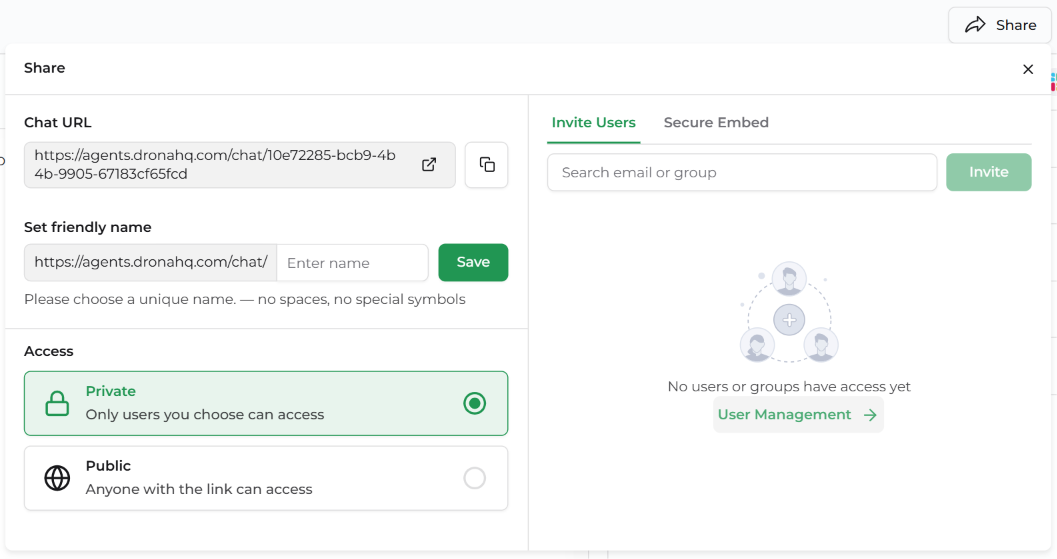
This is the right mode for internal tools, gated products, or any agent that should only be available to a known set of users.
To configure access, open your agent and click Share in the top bar. Under Access, select Private — Only users you choose can access.
The right-hand panel gives you two ways to grant access:
- Invite Users — manually invite individuals or groups by email
- Secure Embed — programmatically identify users via a signed JWT (no DronaHQ account needed)
Invite Users
The Invite Users tab lets you grant access to specific people or groups within your DronaHQ organisation.
Inviting by email or group
- Open the Share panel and go to the Invite Users tab
- In the search field, type an email address or group name
- Click Invite
The invited user will receive access immediately. They must have (or create) a DronaHQ account to log in and use the agent.
Managing existing users
To view and manage who currently has access, click User Management → in the Invite Users panel. From there you can review access, adjust roles, and remove users.
💡 Tip: Use groups to manage access at scale — invite a team group once rather than adding people one by one.
Secure Embed
The Secure Embed tab is for embedding the agent in your own product and identifying users via a signed JWT — without requiring them to have a DronaHQ account.
This is the right approach when:
- You want to embed the agent in your own application
- Your users have accounts in your system, not DronaHQ
- You need per-user conversation history scoped to your own identity
For the full Secure Embed setup — including how to generate your Identity Secret, sign a JWT, embed the agent via iframe, and handle token refresh — see the Secure Embed documentation.
Choosing Between Invite Users and Secure Embed
| Invite Users | Secure Embed | |
|---|---|---|
| User needs a DronaHQ account | Yes | No |
| Access is managed in DronaHQ | Yes | No — managed in your app |
| Best for | Internal teams, org members | Customer-facing or embedded products |
| Identity source | DronaHQ account | Your own auth system (JWT) |
| Per-user conversation history | Yes | Yes |